> ## Documentation Index
> Fetch the complete documentation index at: https://docs.terratwin.com/llms.txt
> Use this file to discover all available pages before exploring further.
# Rail transport
> Use RAIL transport operations to calculate emissions for cargo moved by train.
Rail transport operations model cargo moved by train between rail yards.
Set the transport operation `type` to `RAIL` within a [transport chain](/content/guides/transport-chains) when a shipment leg is moved by rail.
TerraTwin can calculate rail emissions from a very small amount of information, but rail transport is sensitive to the train consist, the selected rail yards, the rail route, and whether each section of the route is operated using electric or diesel traction.
Use `type: "RAIL"` in a `transportChain` transport element.
TerraTwin treats that element as a requested rail leg between the surrounding transport chain locations.
Use `vehicle` when you know the train consist.
If the exact consist is unknown, use `trainType`, `grossTrainWeight`, and `cargo.category` to guide train selection.
If the leg does not start or end at a `RAIL_YARD`, TerraTwin selects suitable rail yards automatically.
The rail movement is routed between those rail yards.
If the origin or destination is not already a rail yard, TerraTwin can automatically add first mile and last mile road transport.
Use `firstMile` and `lastMile` when the road vehicle configuration is known.
Use `RAIL` when cargo is modeled as freight moving by train.
A road journey that uses a roll-on/roll-off train service, such as the Channel Tunnel shuttle, is normally modeled as `ROAD`.
When the selected road route uses the rail crossing, TerraTwin represents it as a sub-operation of the `ROAD` transport operation.
***
## Basic shape
A minimal rail operation only needs `type: "RAIL"` in the transport chain:
```json theme={null}
{
"cargo": {
"weight": {
"value": 20,
"unit": "METRIC_TONNE"
}
},
"origin": {
"type": "PLACE",
"postcode": "CF10 1EP",
"countryCode": "GB"
},
"destination": {
"type": "PLACE",
"postcode": "8000",
"countryCode": "BE"
},
"transportChain": [
{
"type": "RAIL"
}
]
}
```
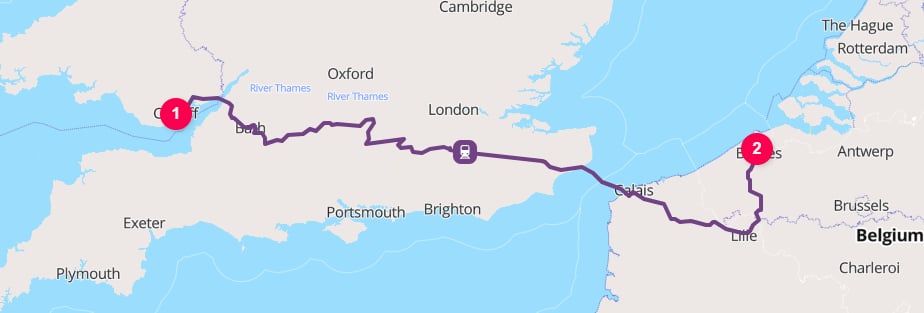
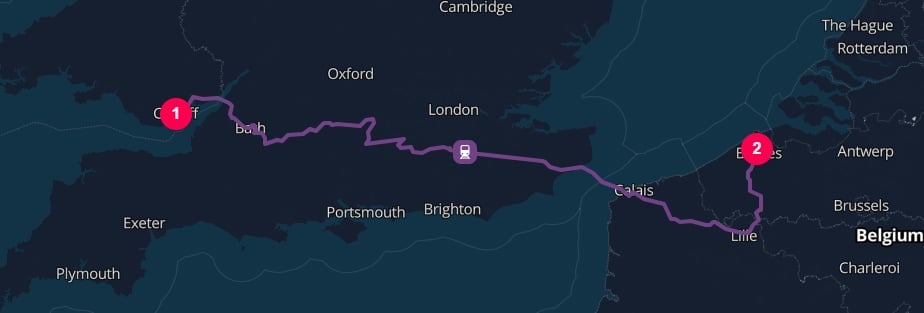 In this request, the transport mode is specified by the `type` property on the transport operation.
Because the origin and destination are places rather than rail yards, TerraTwin selects suitable rail yards and adds road connector movements where needed.
When TerraTwin adds first-mile or last-mile road transport, automatic hub insertion can also add `HUB` operations at the road-to-rail and rail-to-road transfers. See the [logistics hubs guide](/content/guides/hubs#automatic-hub-insertion) for how these hubs are selected and how to control them with `options.hubInsertion`.
The more information you can provide about the train, the more accurately TerraTwin can model the transport operation. The most specific option is to provide the exact train `vehicle` and `energyType`:
```json theme={null}
{
"cargo": {
"weight": {
"value": 20,
"unit": "METRIC_TONNE"
}
},
"origin": {
"type": "RAIL_YARD",
"city": "Fukuoka",
"countryCode": "JP"
},
"destination": {
"type": "RAIL_YARD",
"city": "Tokyo",
"countryCode": "JP"
},
"transportChain": [
{
"type": "RAIL",
"vehicle": "DOUBLE_CONTAINER_TRAIN",
"energyType": "ELECTRICITY"
}
]
}
```
In this request, the transport mode is specified by the `type` property on the transport operation.
Because the origin and destination are places rather than rail yards, TerraTwin selects suitable rail yards and adds road connector movements where needed.
When TerraTwin adds first-mile or last-mile road transport, automatic hub insertion can also add `HUB` operations at the road-to-rail and rail-to-road transfers. See the [logistics hubs guide](/content/guides/hubs#automatic-hub-insertion) for how these hubs are selected and how to control them with `options.hubInsertion`.
The more information you can provide about the train, the more accurately TerraTwin can model the transport operation. The most specific option is to provide the exact train `vehicle` and `energyType`:
```json theme={null}
{
"cargo": {
"weight": {
"value": 20,
"unit": "METRIC_TONNE"
}
},
"origin": {
"type": "RAIL_YARD",
"city": "Fukuoka",
"countryCode": "JP"
},
"destination": {
"type": "RAIL_YARD",
"city": "Tokyo",
"countryCode": "JP"
},
"transportChain": [
{
"type": "RAIL",
"vehicle": "DOUBLE_CONTAINER_TRAIN",
"energyType": "ELECTRICITY"
}
]
}
```
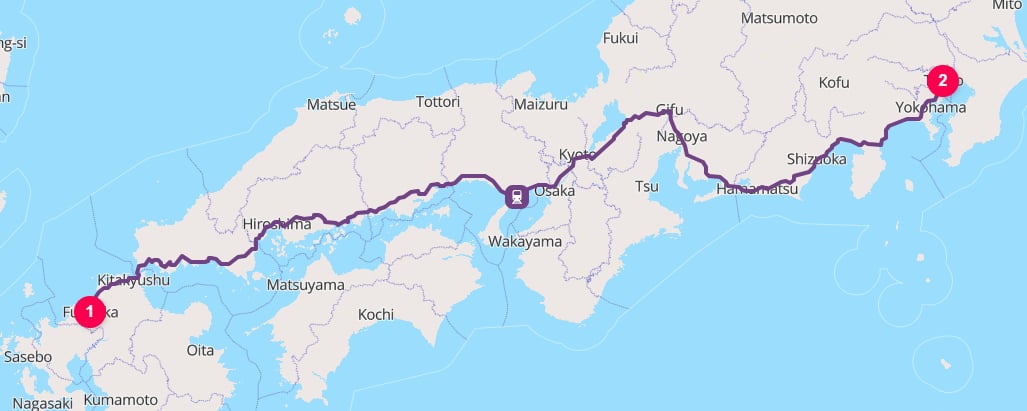
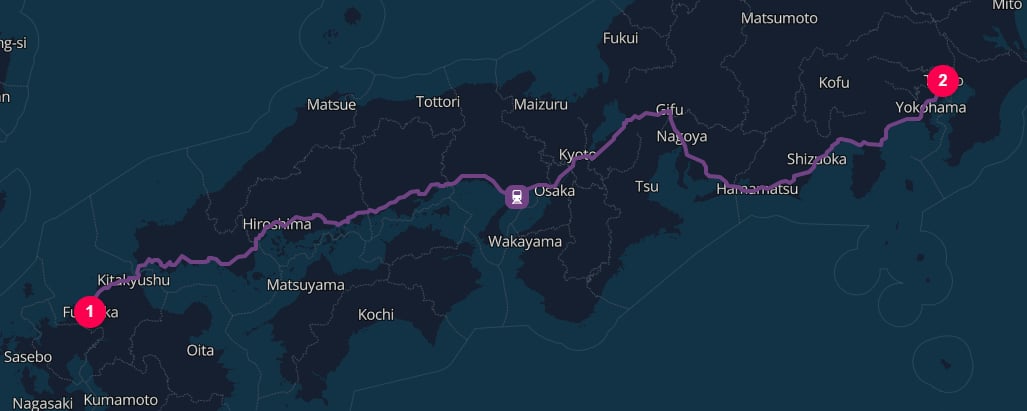 This asks TerraTwin to model the cargo as being transported by an electric, double-stack container freight train.
Because both endpoints are rail yards, no first-mile or last-mile road connectors are needed.
***
## Properties
| Property | Required | What it does |
| ------------------- | -------: | ------------------------------------------------------------------------------------------------------------------------------------------------------------------------------------------------------ |
| `type` | Yes | Selects rail transport. Use `RAIL`. |
| `vehicle` | No | Identifies the train consist directly. When provided, it takes precedence over `trainType`, `grossTrainWeight`, and `cargo.category`. |
| `trainType` | No | Selects the train selection strategy. Use `MANIFEST` for mixed cargo trains or `UNIT` for dedicated commodity trains. |
| `grossTrainWeight` | No | Gross train weight. Used to choose the size of a `MANIFEST` train. Ignored for `UNIT` trains. |
| `energyType` | No | Requested traction energy. Use `ELECTRICITY` or `DIESEL`. The default is `ELECTRICITY`, but electric traction is only used where the rail line supports it. |
| `departureDateTime` | No | The departure date and time. |
| `arrivalDateTime` | No | The arrival date and time. |
| `firstMile` | No | Road vehicle configuration for the automatic road movement from a non-rail-yard origin to the selected origin rail yard. |
| `lastMile` | No | Road vehicle configuration for the automatic road movement from the selected destination rail yard to a non-rail-yard destination. |
| `id` | No | Optional identifier for the transport operation. When provided, the same identifier is returned on the corresponding result element, making it easier to match request operations to response results. |
| `context` | No | Caller provided metadata returned with the corresponding result element. Preserved if the rail operation falls back to another mode. |
***
## Selecting rail as the mode
The mode is selected with the `type` property on a transport operation:
```json theme={null}
{
"transportChain": [
{
"type": "RAIL"
}
]
}
```
The rail operation runs between the nearest chain boundaries.
Those boundaries come from the top-level `origin` and `destination`, or from surrounding `HUB` elements in a larger `transportChain`.
```json theme={null}
{
"cargo": {
"weight": {
"value": 15,
"unit": "METRIC_TONNE"
}
},
"origin": {
"type": "HARBOR",
"unLoCode": "USANC"
},
"destination": {
"type": "HARBOR",
"unLoCode": "CASJF"
},
"transportChain": [
{
"type": "WATER"
}, {
"type": "HUB",
"location": {
"type": "HARBOR",
"unLoCode": "CAVAN"
}
}, {
"type": "RAIL"
}, {
"type": "HUB",
"location": {
"type": "HARBOR",
"unLoCode": "CAQUE"
}
}, {
"type": "WATER"
}
]
}
```
This asks TerraTwin to model the cargo as being transported by an electric, double-stack container freight train.
Because both endpoints are rail yards, no first-mile or last-mile road connectors are needed.
***
## Properties
| Property | Required | What it does |
| ------------------- | -------: | ------------------------------------------------------------------------------------------------------------------------------------------------------------------------------------------------------ |
| `type` | Yes | Selects rail transport. Use `RAIL`. |
| `vehicle` | No | Identifies the train consist directly. When provided, it takes precedence over `trainType`, `grossTrainWeight`, and `cargo.category`. |
| `trainType` | No | Selects the train selection strategy. Use `MANIFEST` for mixed cargo trains or `UNIT` for dedicated commodity trains. |
| `grossTrainWeight` | No | Gross train weight. Used to choose the size of a `MANIFEST` train. Ignored for `UNIT` trains. |
| `energyType` | No | Requested traction energy. Use `ELECTRICITY` or `DIESEL`. The default is `ELECTRICITY`, but electric traction is only used where the rail line supports it. |
| `departureDateTime` | No | The departure date and time. |
| `arrivalDateTime` | No | The arrival date and time. |
| `firstMile` | No | Road vehicle configuration for the automatic road movement from a non-rail-yard origin to the selected origin rail yard. |
| `lastMile` | No | Road vehicle configuration for the automatic road movement from the selected destination rail yard to a non-rail-yard destination. |
| `id` | No | Optional identifier for the transport operation. When provided, the same identifier is returned on the corresponding result element, making it easier to match request operations to response results. |
| `context` | No | Caller provided metadata returned with the corresponding result element. Preserved if the rail operation falls back to another mode. |
***
## Selecting rail as the mode
The mode is selected with the `type` property on a transport operation:
```json theme={null}
{
"transportChain": [
{
"type": "RAIL"
}
]
}
```
The rail operation runs between the nearest chain boundaries.
Those boundaries come from the top-level `origin` and `destination`, or from surrounding `HUB` elements in a larger `transportChain`.
```json theme={null}
{
"cargo": {
"weight": {
"value": 15,
"unit": "METRIC_TONNE"
}
},
"origin": {
"type": "HARBOR",
"unLoCode": "USANC"
},
"destination": {
"type": "HARBOR",
"unLoCode": "CASJF"
},
"transportChain": [
{
"type": "WATER"
}, {
"type": "HUB",
"location": {
"type": "HARBOR",
"unLoCode": "CAVAN"
}
}, {
"type": "RAIL"
}, {
"type": "HUB",
"location": {
"type": "HARBOR",
"unLoCode": "CAQUE"
}
}, {
"type": "WATER"
}
]
}
```
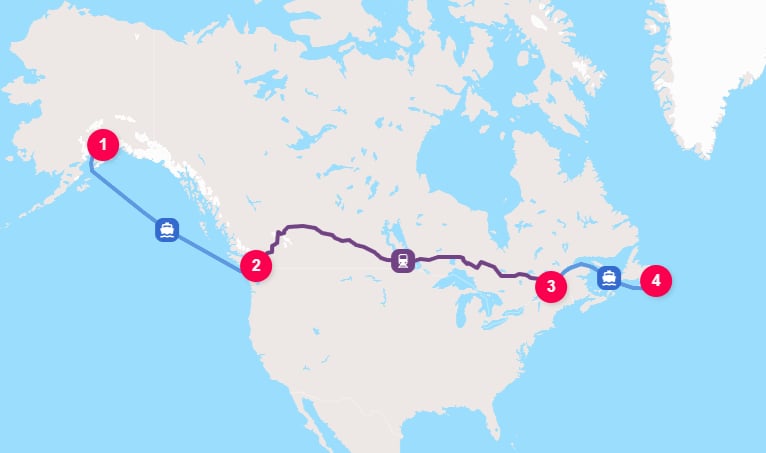
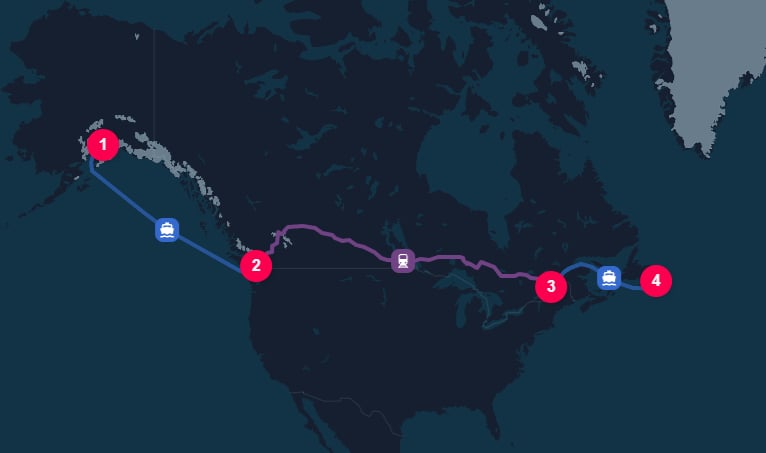 In this example, the `HUB` elements explicitly separate the sea and rail legs.
These intermediate hubs omit `hubType`.
With automatic hub insertion enabled, TerraTwin selects their hub types from the surrounding `WATER` to `RAIL` and `RAIL` to `WATER` transitions.
With `options.hubInsertion: "MANUAL"`, they remain location boundaries but do not add hub emissions. See the [How a hub type is selected](/content/guides/hubs#how-a-hub-type-is-selected) for hub type selection and insertion rules.
***
## Train selection
Rail supports two broad train consist families:
Use `trainType: "MANIFEST"` for general mixed cargo services using multiple wagon types.
Emissions are calculated from the train size, which can be selected using `grossTrainWeight`.
Use `trainType: "UNIT"` for dedicated services carrying one cargo type.
Emissions are calculated from the cargo specific train configuration selected from `cargo.category`.
There are several ways to influence train selection. You do not need to provide all of them. In general, the more information you can provide about the train, the more accurately TerraTwin can model the transport operation.
TerraTwin applies train selection in this order:
| Priority | Inputs provided | Selection behavior |
| -------: | -------------------------------------------- | ------------------------------------------------------------------------------------------------------------------------------------------------------------------------------------------- |
| 1 | `vehicle` | Uses the specified train class directly. |
| 2 | `trainType: "MANIFEST"` + `grossTrainWeight` | Treats the operation as a manifest train and maps the gross train weight to a manifest train size. |
| 3 | `trainType: "UNIT"` + `cargo.category` | Treats the operation as a unit train and maps the cargo category to a dedicated unit train configuration. |
| 4 | `trainType: "MANIFEST"` only | Treats the operation as a manifest train and selects a default manifest train size based on the region of operation. |
| 5 | `trainType: "UNIT"` only | Treats the operation as a unit train and uses `cargo.category` to select the unit train. If `cargo.category` is omitted, it defaults to `GENERAL`, which is treated as containerized cargo. |
| 6 | `grossTrainWeight` only | Infers a manifest train and maps the gross train weight to a manifest train size. |
| 7 | `cargo.category` only | Infers a unit train and maps the cargo category to a dedicated unit train configuration. |
***
## Direct train selection with `vehicle`
Use `vehicle` when you know the train consist.
Supported train values include both manifest train sizes and unit train types:
| Train value | Description |
| ------------------------------------------------------------------------ | ----------------------------------------------------------------------------------------------------------------------------- |
|
In this example, the `HUB` elements explicitly separate the sea and rail legs.
These intermediate hubs omit `hubType`.
With automatic hub insertion enabled, TerraTwin selects their hub types from the surrounding `WATER` to `RAIL` and `RAIL` to `WATER` transitions.
With `options.hubInsertion: "MANUAL"`, they remain location boundaries but do not add hub emissions. See the [How a hub type is selected](/content/guides/hubs#how-a-hub-type-is-selected) for hub type selection and insertion rules.
***
## Train selection
Rail supports two broad train consist families:
Use `trainType: "MANIFEST"` for general mixed cargo services using multiple wagon types.
Emissions are calculated from the train size, which can be selected using `grossTrainWeight`.
Use `trainType: "UNIT"` for dedicated services carrying one cargo type.
Emissions are calculated from the cargo specific train configuration selected from `cargo.category`.
There are several ways to influence train selection. You do not need to provide all of them. In general, the more information you can provide about the train, the more accurately TerraTwin can model the transport operation.
TerraTwin applies train selection in this order:
| Priority | Inputs provided | Selection behavior |
| -------: | -------------------------------------------- | ------------------------------------------------------------------------------------------------------------------------------------------------------------------------------------------- |
| 1 | `vehicle` | Uses the specified train class directly. |
| 2 | `trainType: "MANIFEST"` + `grossTrainWeight` | Treats the operation as a manifest train and maps the gross train weight to a manifest train size. |
| 3 | `trainType: "UNIT"` + `cargo.category` | Treats the operation as a unit train and maps the cargo category to a dedicated unit train configuration. |
| 4 | `trainType: "MANIFEST"` only | Treats the operation as a manifest train and selects a default manifest train size based on the region of operation. |
| 5 | `trainType: "UNIT"` only | Treats the operation as a unit train and uses `cargo.category` to select the unit train. If `cargo.category` is omitted, it defaults to `GENERAL`, which is treated as containerized cargo. |
| 6 | `grossTrainWeight` only | Infers a manifest train and maps the gross train weight to a manifest train size. |
| 7 | `cargo.category` only | Infers a unit train and maps the cargo category to a dedicated unit train configuration. |
***
## Direct train selection with `vehicle`
Use `vehicle` when you know the train consist.
Supported train values include both manifest train sizes and unit train types:
| Train value | Description |
| ------------------------------------------------------------------------ | ----------------------------------------------------------------------------------------------------------------------------- |
| LIGHT\_TRAIN | Mixed cargo manifest train below 750 tonnes gross train weight. |
| AVERAGE\_TRAIN | Mixed cargo manifest train between 750 and 1,250 tonnes gross train weight. |
| LARGE\_TRAIN | Mixed cargo manifest train between 1,250 and 1,750 tonnes gross train weight. |
| EXTRA\_LARGE\_TRAIN | Mixed cargo manifest train between 1,750 and 2,250 tonnes gross train weight. |
| HEAVY\_TRAIN | Mixed cargo manifest train above 2,250 tonnes gross train weight. |
| AUTOMOBILE\_TRAIN | Dedicated unit train using autorack wagons for finished vehicles. |
| CHEMICALS\_TRAIN | Dedicated unit train using tank or specialized wagons for chemical products, oil, petroleum derivatives, and liquefied gases. |
| CONTAINER\_TRAIN | Dedicated unit train using flat or well wagons for containers. |
| DOUBLE\_CONTAINER\_TRAIN | Dedicated unit train using well wagons for double-stacked containers. |
| COAL\_AND\_STEEL\_TRAIN | Dedicated unit train using hopper and gondola wagons for coal and steel products. |
| BUILDING\_MATERIALS\_TRAIN | Dedicated unit train for bulk and palletized building materials. |
| MANUFACTURED\_PRODUCTS\_TRAIN | Dedicated unit train for consumer or industrial manufactured goods. |
| CEREALS\_TRAIN | Dedicated unit train using covered hopper wagons for cereal grains. |
```json theme={null}
{
"cargo": {
"weight": {
"value": 500,
"unit": "METRIC_TONNE"
}
},
"origin": {
"type": "RAIL_YARD",
"address": "J5419 San Juan",
"countryCode": "AR"
},
"destination": {
"type": "HARBOR",
"unLoCode": "ARBUE"
},
"transportChain": [
{
"type": "RAIL",
"vehicle": "BUILDING_MATERIALS_TRAIN"
}
]
}
```
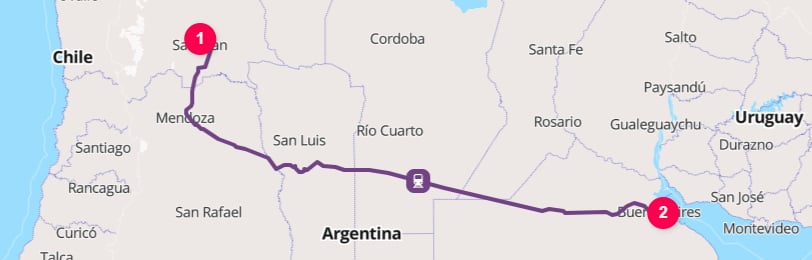
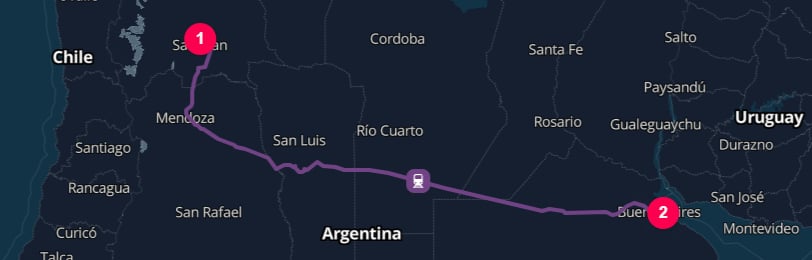 When `vehicle` is set, TerraTwin uses that vehicle class for train selection. Any `trainType`, `grossTrainWeight`, or `cargo.category` values are not used to choose the train.
`cargo.category` may still affect other parts of the calculation. For example, it can influence cargo density, climate-control defaults, connector road vehicle selection, and hub defaults. It is only ignored for the purpose of selecting the train when `vehicle` is provided.
***
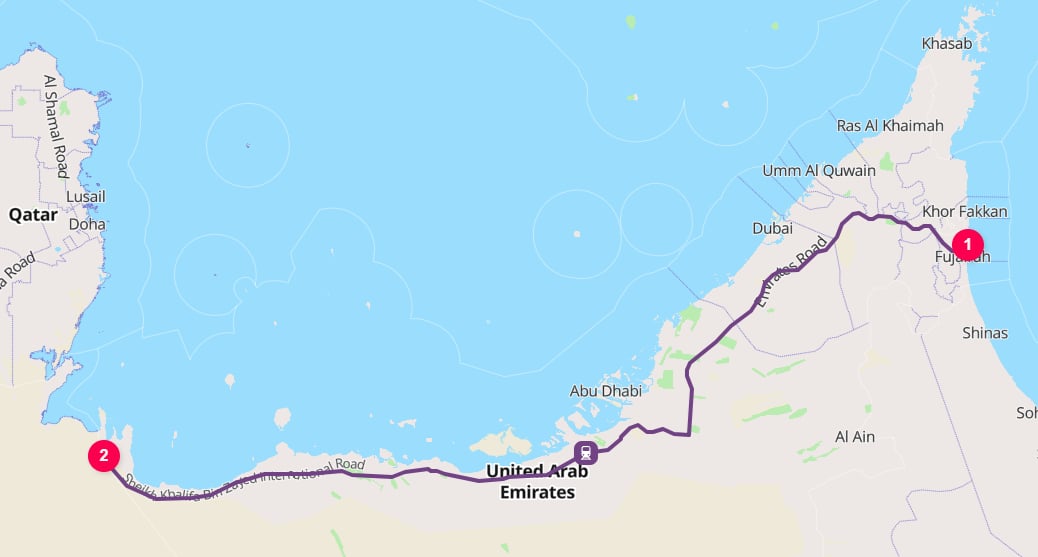
## Manifest trains and `grossTrainWeight`
Use `trainType: "MANIFEST"` when the cargo moves on a general mixed cargo freight train.
For manifest trains, `grossTrainWeight` is used to choose the train size.
```json theme={null}
{
"cargo": {
"weight": {
"value": 10,
"unit": "METRIC_TONNE"
}
},
"origin": {
"type": "RAIL_YARD",
"unLoCode": "AEFJR"
},
"destination": {
"type": "RAIL_YARD",
"address": "Al Ghuwaifat",
"countryCode": "AE"
},
"transportChain": [
{
"type": "RAIL",
"trainType": "MANIFEST",
"grossTrainWeight": {
"value": 1600,
"unit": "METRIC_TONNE"
}
}
]
}
```
When `vehicle` is set, TerraTwin uses that vehicle class for train selection. Any `trainType`, `grossTrainWeight`, or `cargo.category` values are not used to choose the train.
`cargo.category` may still affect other parts of the calculation. For example, it can influence cargo density, climate-control defaults, connector road vehicle selection, and hub defaults. It is only ignored for the purpose of selecting the train when `vehicle` is provided.
***
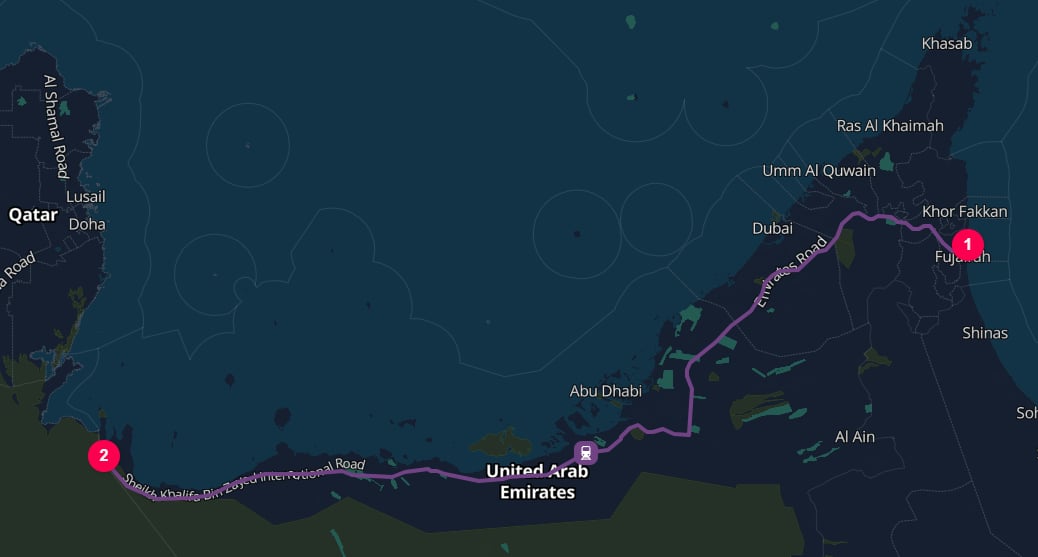
## Manifest trains and `grossTrainWeight`
Use `trainType: "MANIFEST"` when the cargo moves on a general mixed cargo freight train.
For manifest trains, `grossTrainWeight` is used to choose the train size.
```json theme={null}
{
"cargo": {
"weight": {
"value": 10,
"unit": "METRIC_TONNE"
}
},
"origin": {
"type": "RAIL_YARD",
"unLoCode": "AEFJR"
},
"destination": {
"type": "RAIL_YARD",
"address": "Al Ghuwaifat",
"countryCode": "AE"
},
"transportChain": [
{
"type": "RAIL",
"trainType": "MANIFEST",
"grossTrainWeight": {
"value": 1600,
"unit": "METRIC_TONNE"
}
}
]
}
```
 The gross weight is mapped to a manifest train class:
| Gross train weight | Selected manifest train |
| ------------------------- | ----------------------- |
| Less than 750 tonnes | `LIGHT_TRAIN` |
| 750 to 1,250 tonnes | `AVERAGE_TRAIN` |
| 1,250 to 1,750 tonnes | `LARGE_TRAIN` |
| 1,750 to 2,250 tonnes | `EXTRA_LARGE_TRAIN` |
| Greater than 2,250 tonnes | `HEAVY_TRAIN` |
`grossTrainWeight` supports these units:
| Unit | Meaning |
| -------------- | --------------------------------------------------- |
| `KILOGRAM` | Kilograms. |
| `METRIC_TONNE` | Metric tonnes, where 1 metric tonne is 1,000 kg. |
| `POUND` | Pounds. |
| `US_SHORT_TON` | U.S. short tons, where 1 short ton is 2,000 pounds. |
If `trainType` is `MANIFEST` and `grossTrainWeight` is omitted, TerraTwin chooses a default manifest train size based on the region of operation.
For example, `AVERAGE_TRAIN` is the European default and `HEAVY_TRAIN` is the USA and Canada default.
***
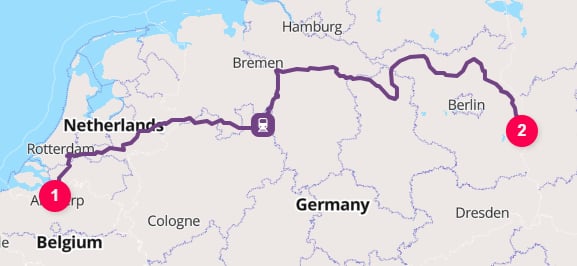
## Unit trains and cargo category mappings
Use `trainType: "UNIT"` when the cargo moves on a dedicated freight train carrying one cargo type.
For unit trains, `grossTrainWeight` is ignored and `cargo.category` is used to select the train configuration.
```json theme={null}
{
"cargo": {
"category": "COAL_AND_STEEL",
"weight": {
"value": 5000,
"unit": "METRIC_TONNE"
}
},
"origin": {
"type": "HARBOR",
"unLoCode": "BEANR"
},
"destination": {
"type": "PLACE",
"address": "ArcelorMittal Eisenhüttenstadt",
"countryCode": "DE"
},
"transportChain": [
{
"type": "RAIL",
"trainType": "UNIT",
"energyType": "ELECTRICITY"
}
]
}
```
The gross weight is mapped to a manifest train class:
| Gross train weight | Selected manifest train |
| ------------------------- | ----------------------- |
| Less than 750 tonnes | `LIGHT_TRAIN` |
| 750 to 1,250 tonnes | `AVERAGE_TRAIN` |
| 1,250 to 1,750 tonnes | `LARGE_TRAIN` |
| 1,750 to 2,250 tonnes | `EXTRA_LARGE_TRAIN` |
| Greater than 2,250 tonnes | `HEAVY_TRAIN` |
`grossTrainWeight` supports these units:
| Unit | Meaning |
| -------------- | --------------------------------------------------- |
| `KILOGRAM` | Kilograms. |
| `METRIC_TONNE` | Metric tonnes, where 1 metric tonne is 1,000 kg. |
| `POUND` | Pounds. |
| `US_SHORT_TON` | U.S. short tons, where 1 short ton is 2,000 pounds. |
If `trainType` is `MANIFEST` and `grossTrainWeight` is omitted, TerraTwin chooses a default manifest train size based on the region of operation.
For example, `AVERAGE_TRAIN` is the European default and `HEAVY_TRAIN` is the USA and Canada default.
***
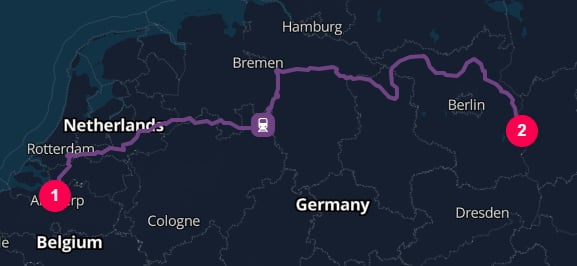
## Unit trains and cargo category mappings
Use `trainType: "UNIT"` when the cargo moves on a dedicated freight train carrying one cargo type.
For unit trains, `grossTrainWeight` is ignored and `cargo.category` is used to select the train configuration.
```json theme={null}
{
"cargo": {
"category": "COAL_AND_STEEL",
"weight": {
"value": 5000,
"unit": "METRIC_TONNE"
}
},
"origin": {
"type": "HARBOR",
"unLoCode": "BEANR"
},
"destination": {
"type": "PLACE",
"address": "ArcelorMittal Eisenhüttenstadt",
"countryCode": "DE"
},
"transportChain": [
{
"type": "RAIL",
"trainType": "UNIT",
"energyType": "ELECTRICITY"
}
]
}
```
 The automatic unit train selection follows the cargo category:
| `cargo.category` | Typical selected unit train | Notes |
| ----------------------------------------------------------------- | ---------------------------------------------------------------------------------------------------------------------------------- | ---------------------------------------------------------------------------------------------------------------------------------------------- |
|
The automatic unit train selection follows the cargo category:
| `cargo.category` | Typical selected unit train | Notes |
| ----------------------------------------------------------------- | ---------------------------------------------------------------------------------------------------------------------------------- | ---------------------------------------------------------------------------------------------------------------------------------------------- |
| AUTOMOBILES | AUTOMOBILE\_TRAIN | Finished vehicles carried on autorack wagons. |
| BUILDING\_MATERIALS | BUILDING\_MATERIALS\_TRAIN | Construction materials such as cement, aggregates, bricks, stone, and lumber. |
| CEREALS | CEREALS\_TRAIN | Grain crops and similar agricultural bulk goods. |
| COAL\_AND\_STEEL | COAL\_AND\_STEEL\_TRAIN | Extra heavy bulk commodities such as coal and steel. |
| GENERAL | CONTAINER\_TRAIN or DOUBLE\_CONTAINER\_TRAIN | Treated as containerized. Region and route practices determine whether single-stack or double-stack container rail is used. |
| REFRIGERATED\_BULK | CONTAINER\_TRAIN or DOUBLE\_CONTAINER\_TRAIN | Treated as containerized refrigerated cargo. Region and route practices determine whether single-stack or double-stack container rail is used. |
| LIQUEFIED\_GAS | CHEMICALS\_TRAIN | Liquefied gases carried in specialized tank or pressure equipment. |
| LIQUID\_CHEMICALS | CHEMICALS\_TRAIN | Liquid chemicals carried in tank or specialized wagons. |
| OIL | CHEMICALS\_TRAIN | Crude oil or refined petroleum products carried in tank equipment. |
| SOLID\_CHEMICALS | CHEMICALS\_TRAIN | Solid chemical products carried in appropriate specialized equipment. |
| MANUFACTURED\_PRODUCTS | MANUFACTURED\_PRODUCTS\_TRAIN | Consumer or industrial manufactured goods. |
For containerized categories such as GENERAL and REFRIGERATED\_BULK, TerraTwin applies country specific defaults when selecting the container train configuration. European container rail is modelled as single-stacked, while countries where double-stacking is typical, such as the USA and India, default to double-stacked container trains.
If `cargo.category` is omitted, it defaults to `GENERAL`. With `trainType: "UNIT"`, that means TerraTwin will usually treat the cargo as containerized unless you provide a more specific category.
***
## Energy type and electrification
`energyType` influences rail emissions because electric and diesel traction use different emissions factors.
Rail supports two values:
| Energy type | What it represents |
| ------------- | -------------------------------------------------------------------------------------------------------------------------- |
| `ELECTRICITY` | Energy supplied from the national electrical grid, including transmission, distribution, and pantograph connection losses. |
| `DIESEL` | Petroleum diesel fuel, with country-specific biofuel content where applicable. |
The default is `ELECTRICITY`, but this does not mean the whole route is forced to be electric.
Electricity is only used where the rail line supports electric traction.
Where the route uses non-electrified rail infrastructure, TerraTwin models diesel traction for that part of the route.
```json theme={null}
{
"cargo": {
"weight": {
"value": 1,
"unit": "METRIC_TONNE"
}
},
"origin": {
"type": "HARBOR",
"unLoCode": "GBSOU"
},
"destination": {
"type": "RAIL_YARD",
"address": "Wentloog Freight Terminal",
"countryCode": "GB"
},
"transportChain": [
{
"type": "RAIL",
"trainType": "UNIT",
"energyType": "ELECTRICITY"
}
]
}
```
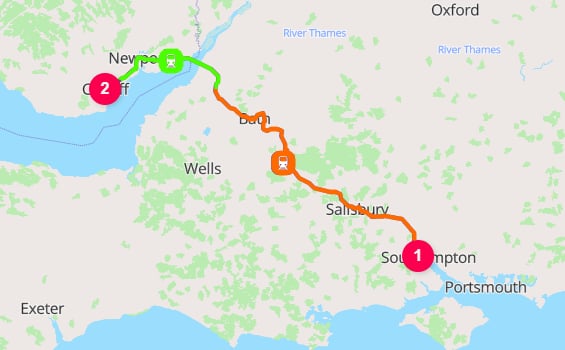
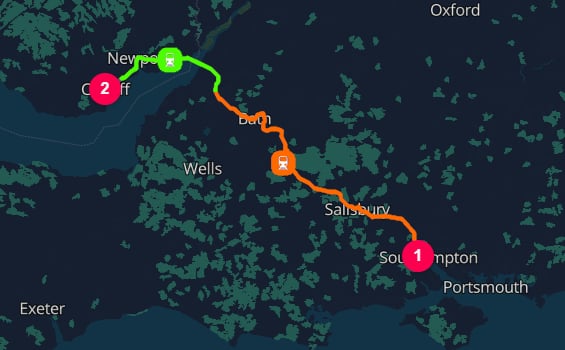 For electric rail sections, emissions are calculated country by country as the train passes through each national grid.
When a rail route crosses a country border, TerraTwin switches the electricity emissions factor at that border.
A route from Belgium through Germany into Poland, for example, can use Belgian grid factors, then German grid factors, then Polish grid factors for the electric portions in each country.
***
## Dates and time zones
`departureDateTime` and `arrivalDateTime` are optional, but provide them when they are known.
They make emissions certificates and analytics more useful by linking results to the period in which the transport occurred.
```json theme={null}
{
"type": "RAIL",
"vehicle": "AVERAGE_TRAIN",
"departureDateTime": "2025-03-28T09:00",
"arrivalDateTime": "2025-03-28T18:30",
"energyType": "ELECTRICITY"
}
```
Local date-times are interpreted using the time zone of the relevant rail yard:
* `departureDateTime` is resolved using the start location's time zone.
* `arrivalDateTime` is resolved using the end location's time zone.
Dates can be supplied in several formats:
**UTC**
```json theme={null}
{ "departureDateTime": "2026-04-12T08:30:00Z" }
```
**Local time**
```json theme={null}
{ "departureDateTime": "2026-04-12T08:30:00" }
```
Interpreted using the start location's time zone for `departureDateTime`, or the end location's time zone for `arrivalDateTime`.
**Explicit offset**
```json theme={null}
{ "departureDateTime": "2026-04-12T08:30:00+02:00" }
```
**Date only**
```json theme={null}
{ "departureDateTime": "2026-04-12" }
```
***
## Route polylines
By default, calculation results do not include the geometry of the calculated rail route.
Set the top-level `options.includeRoutePolylines` property to `true` when you need route geometry for mapping, visualization, or downstream spatial processing:
```json theme={null}
{
"options": {
"includeRoutePolylines": true
},
"cargo": {
"weight": {
"value": 20,
"unit": "METRIC_TONNE"
}
},
"origin": {
"type": "PLACE",
"postcode": "CF10 1EP",
"countryCode": "GB"
},
"destination": {
"type": "PLACE",
"postcode": "8000",
"countryCode": "BE"
},
"transportChain": [
{
"type": "RAIL"
}
]
}
```
When enabled, the `RAIL` result includes a `route` property containing the full train route encoded using the Google Encoded Polyline Algorithm Format.
The rail polyline represents the train movement between the selected rail yards. If TerraTwin adds first-mile or last-mile road transport, those connector movements are returned as separate `ROAD` results. Because `includeRoutePolylines` is a top-level option, their corresponding `route` properties are also included.
`includeRoutePolylines` defaults to `false`. When it is omitted or set to `false`, `route` properties are not included in the response.
***
## Routing failure and mode fallback
Rail routing can fail when TerraTwin cannot build a feasible rail operation for the requested leg.
This can happen when no rail yard can be reached from the start or end location, or when no connecting rail route can be found between the selected rail yards.
Use `options.fallbackTransportModes` to let TerraTwin switch to another transport mode when the requested rail operation cannot be realized.
Fallback modes are tried in the order you provide, excluding the mode that failed.
```json theme={null}
{
"options": {
"fallbackTransportModes": ["ROAD", "WATER", "AIR"]
},
"cargo": {
"weight": {
"value": 100,
"unit": "KILOGRAM"
}
},
"origin": {
"type": "PLACE",
"city": "Reykjavik",
"countryCode": "IS"
},
"destination": {
"type": "PLACE",
"city": "Oslo",
"countryCode": "NO"
},
"transportChain": [
{
"type": "RAIL"
}
]
}
```
For electric rail sections, emissions are calculated country by country as the train passes through each national grid.
When a rail route crosses a country border, TerraTwin switches the electricity emissions factor at that border.
A route from Belgium through Germany into Poland, for example, can use Belgian grid factors, then German grid factors, then Polish grid factors for the electric portions in each country.
***
## Dates and time zones
`departureDateTime` and `arrivalDateTime` are optional, but provide them when they are known.
They make emissions certificates and analytics more useful by linking results to the period in which the transport occurred.
```json theme={null}
{
"type": "RAIL",
"vehicle": "AVERAGE_TRAIN",
"departureDateTime": "2025-03-28T09:00",
"arrivalDateTime": "2025-03-28T18:30",
"energyType": "ELECTRICITY"
}
```
Local date-times are interpreted using the time zone of the relevant rail yard:
* `departureDateTime` is resolved using the start location's time zone.
* `arrivalDateTime` is resolved using the end location's time zone.
Dates can be supplied in several formats:
**UTC**
```json theme={null}
{ "departureDateTime": "2026-04-12T08:30:00Z" }
```
**Local time**
```json theme={null}
{ "departureDateTime": "2026-04-12T08:30:00" }
```
Interpreted using the start location's time zone for `departureDateTime`, or the end location's time zone for `arrivalDateTime`.
**Explicit offset**
```json theme={null}
{ "departureDateTime": "2026-04-12T08:30:00+02:00" }
```
**Date only**
```json theme={null}
{ "departureDateTime": "2026-04-12" }
```
***
## Route polylines
By default, calculation results do not include the geometry of the calculated rail route.
Set the top-level `options.includeRoutePolylines` property to `true` when you need route geometry for mapping, visualization, or downstream spatial processing:
```json theme={null}
{
"options": {
"includeRoutePolylines": true
},
"cargo": {
"weight": {
"value": 20,
"unit": "METRIC_TONNE"
}
},
"origin": {
"type": "PLACE",
"postcode": "CF10 1EP",
"countryCode": "GB"
},
"destination": {
"type": "PLACE",
"postcode": "8000",
"countryCode": "BE"
},
"transportChain": [
{
"type": "RAIL"
}
]
}
```
When enabled, the `RAIL` result includes a `route` property containing the full train route encoded using the Google Encoded Polyline Algorithm Format.
The rail polyline represents the train movement between the selected rail yards. If TerraTwin adds first-mile or last-mile road transport, those connector movements are returned as separate `ROAD` results. Because `includeRoutePolylines` is a top-level option, their corresponding `route` properties are also included.
`includeRoutePolylines` defaults to `false`. When it is omitted or set to `false`, `route` properties are not included in the response.
***
## Routing failure and mode fallback
Rail routing can fail when TerraTwin cannot build a feasible rail operation for the requested leg.
This can happen when no rail yard can be reached from the start or end location, or when no connecting rail route can be found between the selected rail yards.
Use `options.fallbackTransportModes` to let TerraTwin switch to another transport mode when the requested rail operation cannot be realized.
Fallback modes are tried in the order you provide, excluding the mode that failed.
```json theme={null}
{
"options": {
"fallbackTransportModes": ["ROAD", "WATER", "AIR"]
},
"cargo": {
"weight": {
"value": 100,
"unit": "KILOGRAM"
}
},
"origin": {
"type": "PLACE",
"city": "Reykjavik",
"countryCode": "IS"
},
"destination": {
"type": "PLACE",
"city": "Oslo",
"countryCode": "NO"
},
"transportChain": [
{
"type": "RAIL"
}
]
}
```
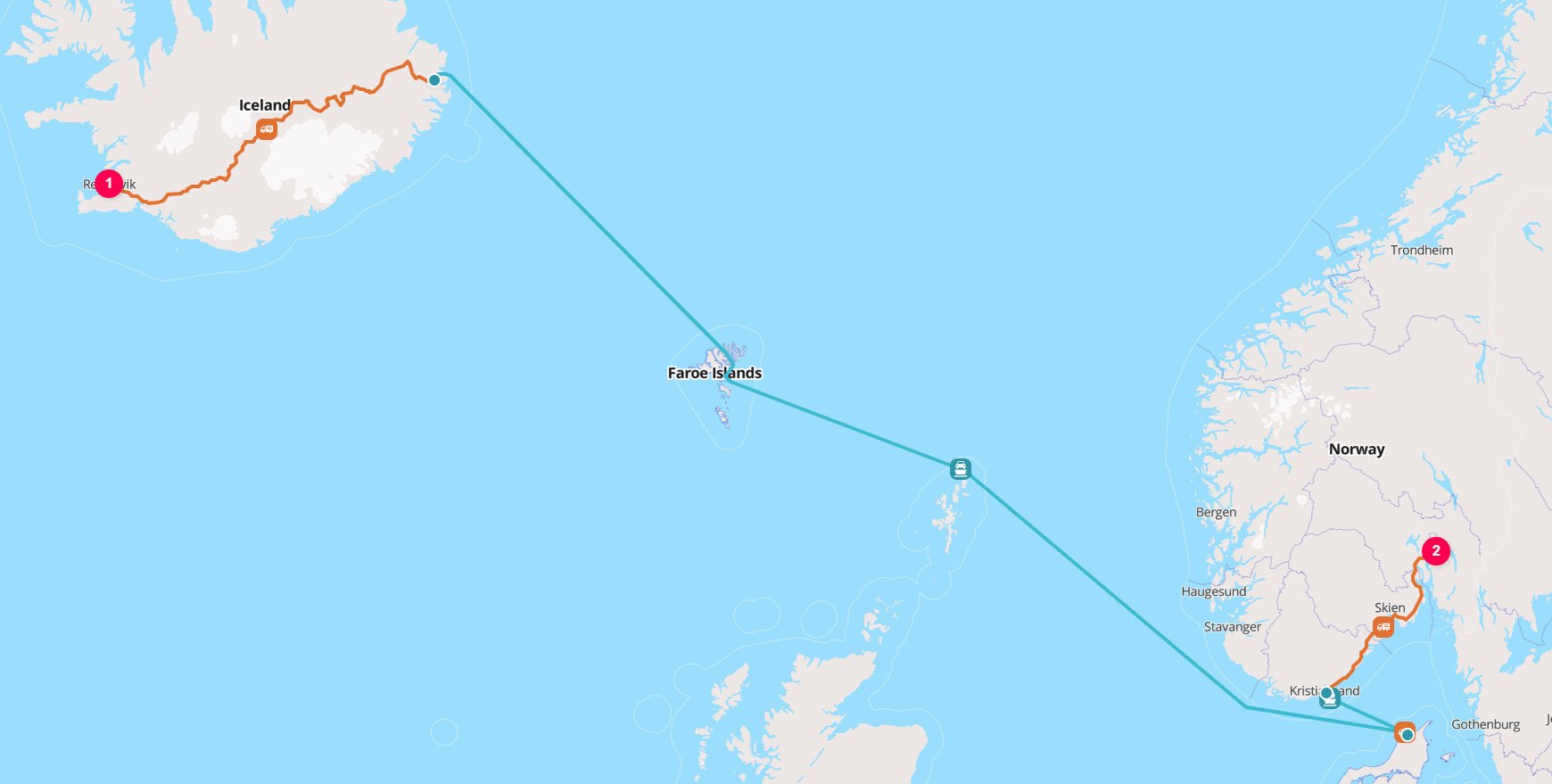
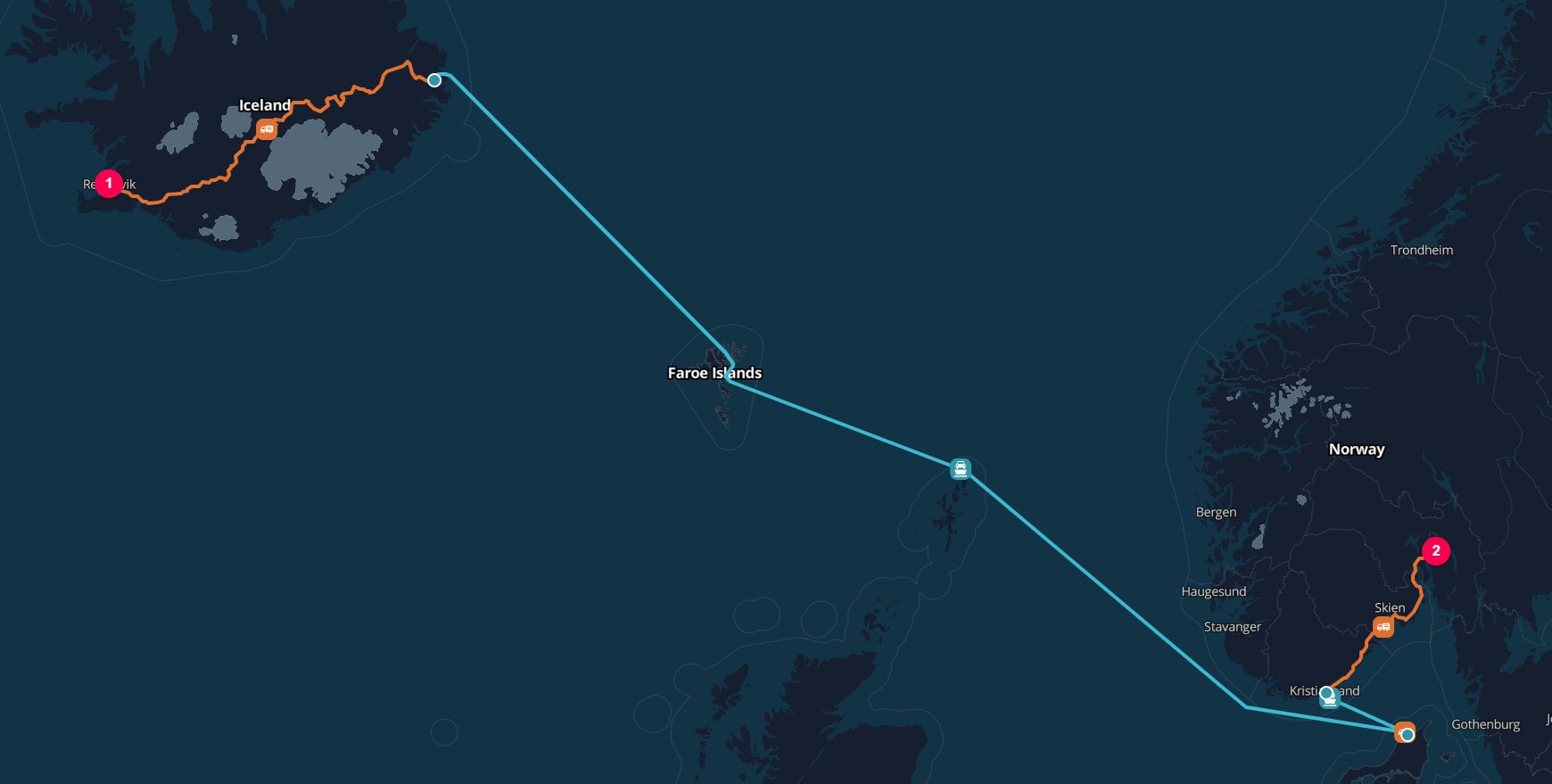 In this request, TerraTwin first attempts to calculate the leg as rail transport.
This fails because there are no railways on Iceland, so no rail route can be generated from Reykjavik.
TerraTwin then tries the fallback modes in order: `ROAD`, `WATER`, then `AIR`.
The `ROAD` fallback succeeds because the route can be calculated as a road journey with RoRo ferry connections from Seyðisfjörður to Kristiansand.
Since `ROAD` is the first fallback mode that can be routed and calculated, that result is returned.
If `firstMile` or `lastMile` settings are configured on the rail leg, TerraTwin applies them to fallback modes where they are relevant.
If every fallback attempt fails, the API returns the error from the final fallback mode attempted.
If a rail operation fails and TerraTwin uses a fallback mode instead, any `id` or `context` provided on the failed rail operation is preserved and returned with the replacement operation's result.
***
## Recommendations
Use `type: "RAIL"` in the transport operation when the leg is known to move by train.
Set `vehicle` to the exact supported train class when the train consist is known. This avoids automatic selection and gives the most direct calculation input.
Use `MANIFEST` for mixed cargo services and `UNIT` for dedicated commodity trains.
For `MANIFEST` trains, provide gross train weight when known so TerraTwin can select the correct train size.
For `UNIT` trains, provide `cargo.category` so TerraTwin can select the correct dedicated train type. Do not rely on the default `GENERAL` category unless the cargo should be treated as containerized general freight.
The default is electric traction where supported, with diesel used on non-electrified rail sections. Set `energyType: "DIESEL"` when the service is known to be diesel hauled.
Use `firstMile` and `lastMile` when the origin or destination is not a rail yard and you know the road vehicle details. Otherwise, let TerraTwin choose appropriate road defaults.
Set `options.includeRoutePolylines` to `true` when you need the calculated train route in the response. If the journey includes first-mile or last-mile road connectors, use the separate `route` value from each returned transport result to reconstruct the complete journey.
Add `options.fallbackTransportModes` when a requested rail route may not be feasible and another mode should be attempted automatically.
In this request, TerraTwin first attempts to calculate the leg as rail transport.
This fails because there are no railways on Iceland, so no rail route can be generated from Reykjavik.
TerraTwin then tries the fallback modes in order: `ROAD`, `WATER`, then `AIR`.
The `ROAD` fallback succeeds because the route can be calculated as a road journey with RoRo ferry connections from Seyðisfjörður to Kristiansand.
Since `ROAD` is the first fallback mode that can be routed and calculated, that result is returned.
If `firstMile` or `lastMile` settings are configured on the rail leg, TerraTwin applies them to fallback modes where they are relevant.
If every fallback attempt fails, the API returns the error from the final fallback mode attempted.
If a rail operation fails and TerraTwin uses a fallback mode instead, any `id` or `context` provided on the failed rail operation is preserved and returned with the replacement operation's result.
***
## Recommendations
Use `type: "RAIL"` in the transport operation when the leg is known to move by train.
Set `vehicle` to the exact supported train class when the train consist is known. This avoids automatic selection and gives the most direct calculation input.
Use `MANIFEST` for mixed cargo services and `UNIT` for dedicated commodity trains.
For `MANIFEST` trains, provide gross train weight when known so TerraTwin can select the correct train size.
For `UNIT` trains, provide `cargo.category` so TerraTwin can select the correct dedicated train type. Do not rely on the default `GENERAL` category unless the cargo should be treated as containerized general freight.
The default is electric traction where supported, with diesel used on non-electrified rail sections. Set `energyType: "DIESEL"` when the service is known to be diesel hauled.
Use `firstMile` and `lastMile` when the origin or destination is not a rail yard and you know the road vehicle details. Otherwise, let TerraTwin choose appropriate road defaults.
Set `options.includeRoutePolylines` to `true` when you need the calculated train route in the response. If the journey includes first-mile or last-mile road connectors, use the separate `route` value from each returned transport result to reconstruct the complete journey.
Add `options.fallbackTransportModes` when a requested rail route may not be feasible and another mode should be attempted automatically.