> ## Documentation Index
> Fetch the complete documentation index at: https://docs.terratwin.com/llms.txt
> Use this file to discover all available pages before exploring further.

# Road transport

> Use ROAD transport operations to calculate emissions for cargo moved by road vehicle.

Road transport operations model cargo moved by road vehicle between locations.
Set the transport operation `type` to `ROAD` within a [transport chain](/content/guides/transport-chains) when a shipment leg is moved by truck, van, or another commercial road vehicle.

Road calculations are most representative when the request provides the vehicle and loading details directly.
If these are omitted, TerraTwin selects suitable defaults using the route’s region of operation and relevant cargo properties, such as category, packaging, and density characteristics.

<Columns cols={2}>
  <Card title="Mode" icon="circle-nodes">
    Use `type: "ROAD"` in a `transportChain` transport element.

    TerraTwin treats that element as a requested road leg between the surrounding transport chain locations.
  </Card>

  <Card title="Vehicle" icon="truck">
    Use `grossWeightBand`, `grossWeight`, `maximumWeight`, or `emptyWeight` when you know the vehicle size.

    If the exact size is unknown, use `vehicle`, `structure`, and `packaging` to help TerraTwin select a suitable default.
  </Card>

  <Card title="Loading" icon="boxes-stacked">
    Use `loadDistribution`, `loadFactor`, and `emptyRunning` when you know how the vehicle capacity was used for the shipment.

    If `loadFactor` or `emptyRunning` are omitted, TerraTwin applies defaults based on the region of operation, selected vehicle class, packaging, and cargo density.
  </Card>

  <Card title="Primary data" icon="gauge-high">
    Use `energyConsumption` when measured fuel, electricity, or efficiency data is available.

    Supplying energy consumption switches the calculation from vehicle modelled emissions to consumption based primary data.
  </Card>
</Columns>

<Note>
  A requested `ROAD` transport element may be realized as several sub-operations in the response when the road route includes roll-on/roll-off ferry or rail movements.
  For example, a road route from France to Great Britain may include a Channel Tunnel rail sub-operation.
</Note>

***

## Basic shape

A minimal road operation only needs `type: "ROAD"` in the transport chain:

```json theme={null}
{
  "cargo": {
    "weight": {
      "value": 1000,
      "unit": "KILOGRAM"
    }
  },
  "origin": {
    "type": "PLACE",
    "postcode": "AB10 1AB",
    "city": "Aberdeen",
    "countryCode": "GB"
  },
  "destination": {
    "type": "PLACE",
    "address": "Castlebay, Isle of Barra HS9 5XD",
    "countryCode": "GB"
  },
  "transportChain": [
    {
      "type": "ROAD"
    }
  ]
}
```

In this request, the transport mode is specified by the `type` property on the transport operation.

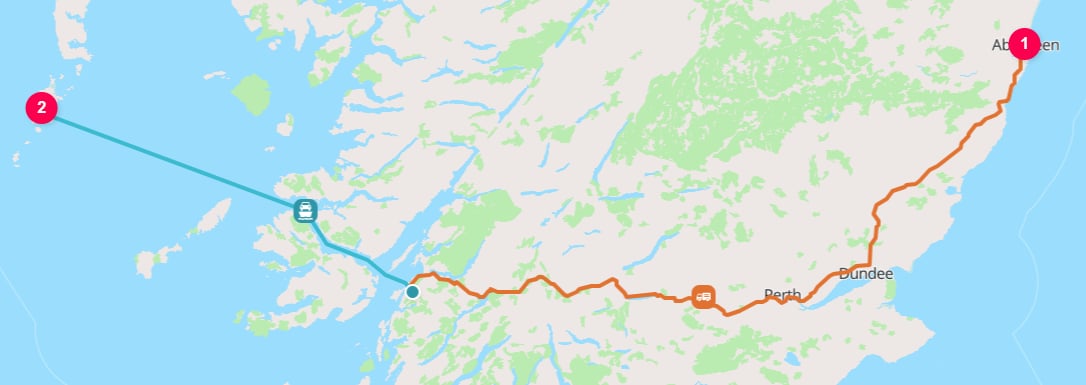
Because no vehicle details are supplied, TerraTwin selects a default road vehicle from the origin country, cargo, trip, and routing context. In this case, the operation is modelled as an `ARTICULATED_TRUCK_34000_TO_40000_KG` with `EURO_6AC` emissions standard, fleet-average vehicle age, `LTL` load distribution, `72%` load factor, and `30%` empty running.

<Frame caption="Aberdeen to Castlebay on the Isle of Barra">
  <img className="block dark:hidden" src="https://mintcdn.com/terratwin/xfw_jqxWpPnqzdZT/images/road-transport/aberdeen-to-isle-of-barra-light.png?fit=max&auto=format&n=xfw_jqxWpPnqzdZT&q=85&s=53a3e92d164e695e2bf5eef4b2188560" width="1086" height="385" data-path="images/road-transport/aberdeen-to-isle-of-barra-light.png" />

  <img className="hidden dark:block" src="https://mintcdn.com/terratwin/xfw_jqxWpPnqzdZT/images/road-transport/aberdeen-to-isle-of-barra-dark.png?fit=max&auto=format&n=xfw_jqxWpPnqzdZT&q=85&s=8d89c36b5825447dc9adad03ef8a9339" width="1086" height="385" data-path="images/road-transport/aberdeen-to-isle-of-barra-dark.png" />
</Frame>

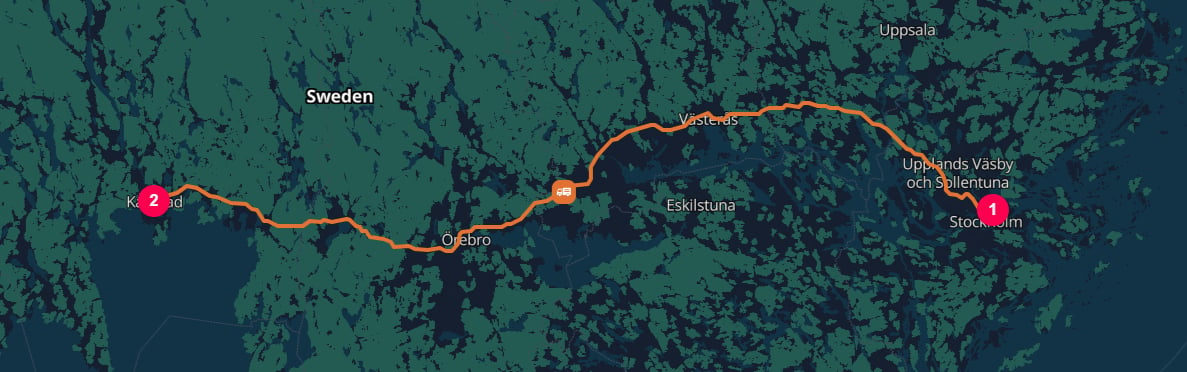
The more information you can provide about the road vehicle and loading, the more accurately TerraTwin can model the operation.

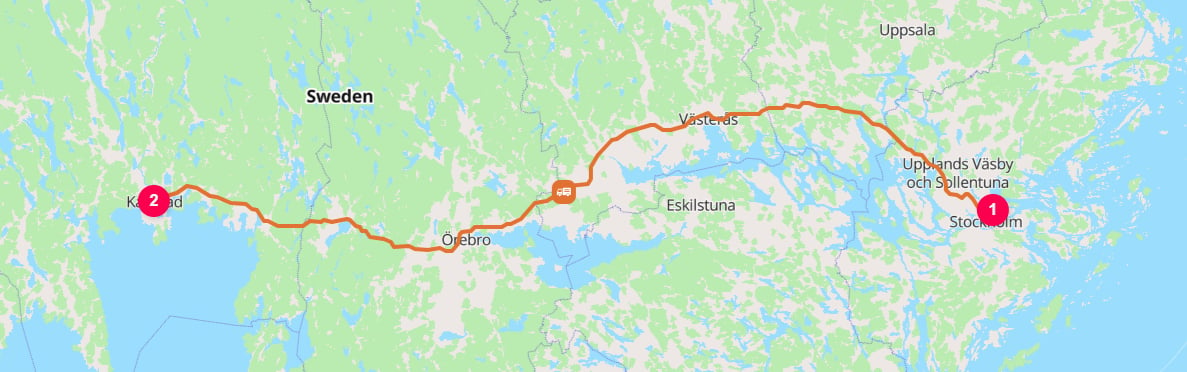
For example, if the shipment moved as palletized cargo on a Swedish high-capacity articulated truck operating on BK4 roads, as part of a shared-load distribution journey, with a `64%` load factor and `50%` empty running, provide those vehicle and loading details directly.

```json theme={null}
{
  "cargo": {
    "category": "MANUFACTURED_PRODUCTS",
    "weight": {
      "value": 562,
      "unit": "KILOGRAM"
    }
  },
  "origin": {
    "type": "HARBOR",
    "UnLoCode": "SESTO"
  },
  "destination": {
    "type": "PLACE",
    "postcode": "652 24",
    "countryCode": "SE"
  },
  "transportChain": [
    {
      "type": "ROAD",
      "structure": "ARTICULATED",
      "grossWeightBand": "64000_TO_72000_KG",
      "energyType": "DIESEL",
      "loadDistribution": "LTL",
      "loadFactor": 64,
      "emptyRunning": 50,
      "packaging": "PALLET"
    }
  ]
}
```
<Note>
  `50%` empty running means the truck completed the loaded outbound trip and then returned empty.
</Note>

<Frame caption="Port of Stockholm [`SESTO`] to Karlstad">
  <img className="block dark:hidden" src="https://mintcdn.com/terratwin/xfw_jqxWpPnqzdZT/images/road-transport/stockholm-to-karlstad-light.png?fit=max&auto=format&n=xfw_jqxWpPnqzdZT&q=85&s=a16a12d35bbe6e20ede1d76534731099" width="1187" height="372" data-path="images/road-transport/stockholm-to-karlstad-light.png" />

  <img className="hidden dark:block" src="https://mintcdn.com/terratwin/xfw_jqxWpPnqzdZT/images/road-transport/stockholm-to-karlstad-dark.png?fit=max&auto=format&n=xfw_jqxWpPnqzdZT&q=85&s=4e1ed57ca05ace4a5256d52f80750bc4" width="1187" height="372" data-path="images/road-transport/stockholm-to-karlstad-dark.png" />
</Frame>

***

## Properties

Road transport has a large set of optional modelling inputs.
The most important inputs fall into four groups:

| Input group               | Useful properties                                                                        |
| ------------------------- | ---------------------------------------------------------------------------------------- |
| Vehicle identity          | `grossWeightBand`, `grossWeight`, `maximumWeight`, `emptyWeight`, `vehicle`, `structure` |
| Vehicle technology        | `energyType`, `yearOfManufacture`, `emissionsStandard`                                   |
| Loading and cargo context | `loadDistribution`, `loadFactor`, `emptyRunning`, `cargo.category`, `packaging`          |
| Operating context         | Route locations, region of operation, `departureDateTime`, `arrivalDateTime`             |

The sections below describe how these properties are used and which ones take priority when several are provided.

| Property            | Required | What it does                                                                                                                                              |
| ------------------- | -------: | --------------------------------------------------------------------------------------------------------------------------------------------------------- |
| `type`              |      Yes | Selects road transport. Use `ROAD`.                                                                                                                       |
| `departureDateTime` |       No | The date and time the road vehicle departed the start location.                                                                                           |
| `arrivalDateTime`   |       No | The date and time the road vehicle arrived at the end location.                                                                                           |
| `vehicle`           |       No | Broad vehicle category used when only limited information is available. Less specific than weight-based vehicle selection.                                |
| `structure`         |       No | Vehicle configuration: `ARTICULATED`, `RIGID`, or `DUMP`. Used with weight and cargo category to refine vehicle selection.                                |
| `grossWeightBand`   |       No | Banded gross vehicle weight. Highest priority vehicle size input. Takes precedence over `grossWeight` when both are supplied.                             |
| `grossWeight`       |       No | Total vehicle weight at the time of measurement, including vehicle, cargo, and equipment.                                                                 |
| `maximumWeight`     |       No | Maximum permitted or gross allowable vehicle weight. TerraTwin converts it into an estimated gross weight before vehicle selection.                       |
| `emptyWeight`       |       No | Unladen or tare weight of the vehicle. TerraTwin converts it into an estimated gross weight before vehicle selection.                                     |
| `yearOfManufacture` |       No | Vehicle manufacture year. If unsupported or omitted, TerraTwin uses a weighted vehicle age aggregation.                                                   |
| `emissionsStandard` |       No | Vehicle emissions class, such as `EURO_6` or `EURO_6DE`. If unsupported for the vehicle, energy, and year, the closest supported class is used.           |
| `loadFactor`        |       No | Percentage utilization of vehicle capacity. Must be greater than `0`. If omitted, TerraTwin defaults it from the selected vehicle and road model context. |
| `emptyRunning`      |       No | Percentage of distance completed without carrying a load. Must be at least `0` and less than `100`.                                                       |
| `packaging`         |       No | Cargo packaging format. Use `CONTAINER` or `PALLET`. Used to help select an appropriate road vehicle and loading assumptions.                             |
| `energyType`        |       No | Propulsion energy. Use `DIESEL`, `GASOLINE`, `ELECTRICITY`, `LNG`, `LPG`, `CNG`, or `HVO100`.                                                             |
| `loadDistribution`  |       No | Cargo's share of vehicle load. Use `LTL` or `FTL`. Defaults to `LTL`.                                                                                     |
| `energyConsumption` |       No | Measured or calculated fuel, electricity, or efficiency data. When provided, TerraTwin calculates emissions from consumption as primary data.             |
| `id`                |       No | Optional identifier for the transport operation. Returned on the corresponding result element.                                                            |
| `context`           |       No | Caller-provided metadata returned with the corresponding result element. Preserved if the road operation falls back to another mode.                      |

***

## Selecting road as the mode

The mode is selected with the `type` property on a transport operation:

```json theme={null}
{
  "transportChain": [
    {
      "type": "ROAD"
    }
  ]
}
```

The road operation runs between the nearest chain boundaries.
Those boundaries come from the top-level `origin` and `destination`, or from surrounding `HUB` elements in a larger `transportChain`.

```json theme={null}
{
  "cargo": {
    "weight": {
      "value": 8,
      "unit": "METRIC_TONNE"
    }
  },
  "origin": {
    "type": "PLACE",
    "postcode": "M13 9PL",
    "countryCode": "GB"
  },
  "destination": {
    "type": "PLACE",
    "city": "Dresden",
    "countryCode": "DE"
  },
  "transportChain": [
    {
      "type": "ROAD",
      "structure": "RIGID",
      "grossWeightBand": "20000_TO_26000_KG",
      "energyType": "ELECTRICITY"
    }, {
      "type": "HUB",
      "hubType": "MARITIME_TERMINAL",
      "location": {
        "type": "HARBOR",
        "unLoCode": "GBSHV"
      }
    }, {
      "type": "WATER",
    }, {
      "type": "HUB",
      "hubType": "MARITIME_TERMINAL",
      "location": {
        "type": "HARBOR",
        "unLoCode": "PLSZZ"
      }
    }, {
      "type": "ROAD",
      "structure": "ARTICULATED",
      "grossWeight": {
        "value": 40,
        "unit": "METRIC_TONNE"
      },
      "energyType": "DIESEL"
    }
  ]
}
```

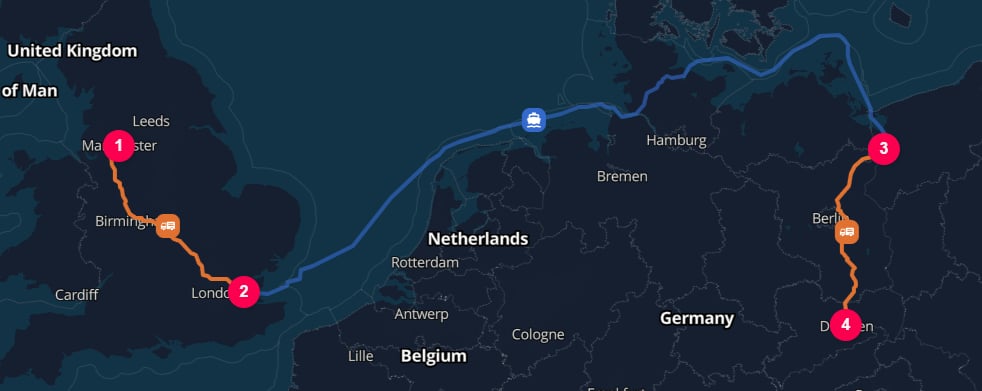
In this example, the `HUB` elements explicitly separates the road legs and the water leg.
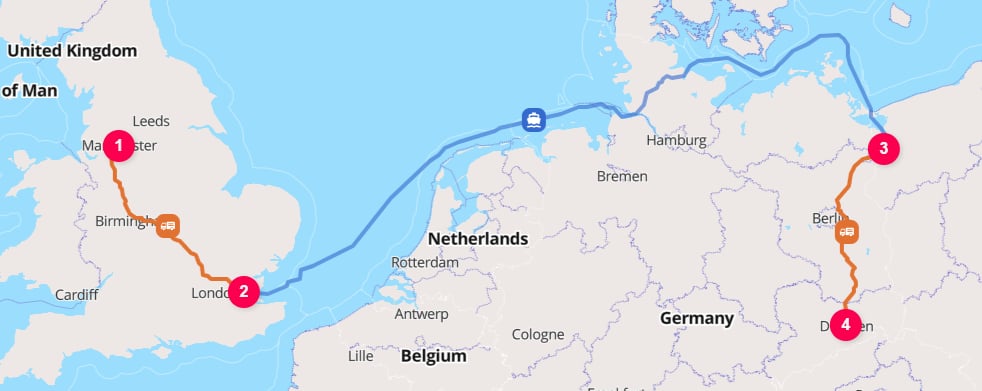
<Frame caption="Manchester to Dresden via the London Gateway [`GBSHV`] and Port of Szczecin [`PLSZZ`]">
  <img className="block dark:hidden" src="https://mintcdn.com/terratwin/xfw_jqxWpPnqzdZT/images/road-transport/manchester-to-dresden-light.png?fit=max&auto=format&n=xfw_jqxWpPnqzdZT&q=85&s=e01accf06b39d1e1476937159db4491f" width="982" height="391" data-path="images/road-transport/manchester-to-dresden-light.png" />

  <img className="hidden dark:block" src="https://mintcdn.com/terratwin/xfw_jqxWpPnqzdZT/images/road-transport/manchester-to-dresden-dark.png?fit=max&auto=format&n=xfw_jqxWpPnqzdZT&q=85&s=ca1acb0fb3651e04ffef38ab9ea647dc" width="982" height="391" data-path="images/road-transport/manchester-to-dresden-dark.png" />
</Frame>

Use separate `ROAD` operations with an explicit `HUB` when the cargo is actually handled between vehicles, depots, or transport providers.
See the [logistics hubs guide](/content/guides/hubs) for choosing the hub location and `hubType`, and for controlling automatic hub insertion.

Do not split out roll-on/roll-off ferry or train movements as separate transport chain operations when the cargo remains on the road vehicle, trailer, or swap body; TerraTwin includes those movements as sub-operations of the road route.

***

## Vehicle selection

There are several ways to influence road vehicle selection.
You do not need to provide all of them.
In general, the more direct the vehicle size input, the more precise the selected road vehicle classification.

Vehicle selection starts with the region of operation. TerraTwin determines this from the starting point of the road transport operation, then applies any supplied vehicle properties within that regional vehicle system.

The supported road vehicle regions are:

* <Badge color="blue" size="sm">North America</Badge>
* <Badge color="blue" size="sm">Europe</Badge>
* <Badge color="blue" size="sm">South America</Badge>
* <Badge color="blue" size="sm">India</Badge>
* <Badge color="blue" size="sm">China</Badge>
* <Badge color="blue" size="sm">Rest of Asia</Badge>
* <Badge color="blue" size="sm">Africa</Badge>

After the region has been determined, TerraTwin applies the available vehicle inputs in priority order:

| Priority | Inputs provided                                | Selection behavior                                                                                                                                                                 |
| -------: | ---------------------------------------------- | ---------------------------------------------------------------------------------------------------------------------------------------------------------------------------------- |
|        1 | `grossWeightBand` and, optionally, `structure` | Uses the supplied gross vehicle weight band within the regional vehicle system. TerraTwin handles conversion between regional weight band systems automatically.                   |
|        2 | `grossWeight` and, optionally, `structure`     | Uses the measured gross vehicle weight, then selects the matching vehicle class for the region.                                                                                    |
|        3 | `maximumWeight` and, optionally, `structure`   | Converts maximum permitted weight into an estimated gross vehicle weight, then selects a vehicle class for the region.                                                             |
|        4 | `emptyWeight` and, optionally, `structure`     | Converts empty or tare weight into an estimated gross vehicle weight, then selects a vehicle class for the region.                                                                 |
|        5 | `vehicle`                                      | Uses a broad vehicle category within the regional vehicle system. This is useful when only a general vehicle size is known, but is less precise than weight based selection.       |
|        6 | `structure`                                    | Selects from the requested structure where possible. `ARTICULATED` selects an articulated vehicle, `RIGID` selects a rigid vehicle, and `DUMP` selects a dump truck (China only)). |
|        7 | `packaging`                                    | If `packaging` is `CONTAINER`, TerraTwin selects a container capable vehicle where no more specific vehicle information is available.                                              |
|        8 | Country of origin                              | If no earlier rule selects a vehicle, TerraTwin defaults from the most common road freight vehicle in the country where the trip begins.                                           |

<Note>
  `cargo.category` can also influence road vehicle selection even though it is not a property of the road operation itself.
  For example, `BUILDING_MATERIALS` may cause TerraTwin to prefer a dump truck vehicle where that is supported, while typically containerized cargo categories can lead to different vehicle and loading assumptions.
</Note>

***

## Direct selection with `grossWeightBand`

Use `grossWeightBand` when you know the road vehicle's gross vehicle weight range.
This is the highest-priority vehicle size input.
When both `grossWeightBand` and `grossWeight` are supplied, `grossWeightBand` takes precedence.

```json theme={null}
{
  "type": "ROAD",
  "structure": "RIGID",
  "grossWeightBand": "19500_TO_33000_LB",
}
```

Gross weight bands are related to the region of operation.
Different vehicle class systems are used in different regions.
TerraTwin handles conversion between these bands automatically, so you can provide the band you have and let the calculation map it to the most appropriate local vehicle class for the route.

| Band family                | Examples                                                                                       | Typical use                                                                                                                     |
| -------------------------- | ---------------------------------------------------------------------------------------------- | ------------------------------------------------------------------------------------------------------------------------------- |
| Metric van and truck bands | `BELOW_1890_KG`, `2725_TO_3500_KG`, `7500_TO_12000_KG`, `40000_TO_50000_KG`                    | General metric inputs and European-style vehicle classes. Some bands are converted when used in China, India, or North America. |
| China specific bands       | `3500_TO_4500_KG`, `7000_TO_8500_KG`, `18000_TO_24000_KG`, `31000_TO_60000_KG`                 | Chinese vehicle weight bands. Converted to the closest appropriate equivalent when used outside China.                          |
| India specific bands       | `3500_TO_5000_KG`, `5000_TO_12000_KG`, `12000_TO_20000_KG`, `30000_TO_60000_KG`                | Indian vehicle weight bands. Converted to the closest appropriate equivalent when used outside India.                           |
| North American bands       | `BELOW_8500_LB`, `8500_TO_14000_LB`, `14000_TO_19500_LB`, `19500_TO_33000_LB`, `OVER_33000_LB` | North American gross vehicle weight classes. Converted when used outside North America.                                         |

<Note>
  A complete list of supported gross weight bands is available in the [API reference](/api-reference/calculate-transport-emissions).
</Note>

***

## Vehicle weight inputs

If you do not have a gross weight band, provide one of the numeric vehicle weight properties.
Each numeric weight object requires `value` and `unit`.

```json theme={null}
{
  "type": "ROAD",
  "structure": "ARTICULATED",
  "grossWeight": {
    "value": 38,
    "unit": "METRIC_TONNE"
  }
}
```

```json theme={null}
{
  "type": "ROAD",
  "structure": "RIGID",
  "maximumWeight": {
    "value": 80000,
    "unit": "POUND"
  }
}
```

| Property        | Best used when                                                                                         | How TerraTwin uses it                                                                                |
| --------------- | ------------------------------------------------------------------------------------------------------ | ---------------------------------------------------------------------------------------------------- |
| `grossWeight`   | You know the vehicle's measured total weight for the operation, for example from a weighbridge ticket. | Uses the value directly, with `structure` to select a vehicle class.                                 |
| `maximumWeight` | You know the vehicle's permitted maximum or gross allowable weight.                                    | Converts the value, with `structure` where supplied, to a gross weight band, giving a vehicle class. |
| `emptyWeight`   | You know only the unladen or tare weight.                                                              | Converts the value, with `structure` where supplied, to a gross weight band, giving a vehicle class. |

Supported units are:

| Unit           | Meaning                                             |
| -------------- | --------------------------------------------------- |
| `KILOGRAM`     | Kilograms.                                          |
| `METRIC_TONNE` | Metric tonnes, where 1 metric tonne is 1,000 kg.    |
| `POUND`        | Pounds.                                             |
| `US_SHORT_TON` | U.S. short tons, where 1 short ton is 2,000 pounds. |

***

## Vehicle structure

`structure` describes the physical configuration of the road vehicle:

| Structure     | What it represents                                                                                                      | Regional support |
| ------------- | ----------------------------------------------------------------------------------------------------------------------- | ---------------- |
| `ARTICULATED` | A tractor unit connected to one or more trailers through pivoting joints.                                               | All regions      |
| `RIGID`       | A single fixed vehicle where the cargo body is mounted on the same chassis as the cab.                                  | All regions      |
| `DUMP`        | A tipper or dump truck with a bed that can be raised to unload bulk materials, typically used for `BUILDING_MATERIALS`. | China only.      |

```json theme={null}
{
  "type": "ROAD",
  "structure": "ARTICULATED",
  "grossWeightBand": "40000_TO_50000_KG"
}
```

If `structure` is not supplied with a weight input, TerraTwin infers it from the vehicle weight and `cargo.category`.
If `structure` is supplied without a vehicle weight input, it is used as a lower priority selector.
A requested `DUMP` structure is used where supported by the operating region; otherwise TerraTwin maps the request to the closest rigid vehicle class.

***

## Broad vehicle categories

Use `vehicle` when you only know the general road vehicle size.
This is less precise than using `grossWeightBand`, `grossWeight`, `maximumWeight`, or `emptyWeight`, but it is useful for sparse carrier data.

| Vehicle                                                          | Description                                                                         |
| ---------------------------------------------------------------- | ----------------------------------------------------------------------------------- |
| <code className="whitespace-nowrap">LCV\_BELOW\_3500\_KG</code>  | Van or light commercial vehicle below 3.5 tonnes gross vehicle weight.              |
| <code className="whitespace-nowrap">LCV\_BELOW\_8500\_LB</code>  | North American van or light commercial vehicle below 8,500 lb gross vehicle weight. |
| <code className="whitespace-nowrap">LIGHT\_DUTY\_VEHICLE</code>  | Generic small distribution or service vehicle.                                      |
| <code className="whitespace-nowrap">MEDIUM\_DUTY\_VEHICLE</code> | Generic medium-sized truck for moderate freight movement.                           |
| <code className="whitespace-nowrap">HEAVY\_DUTY\_VEHICLE</code>  | Generic high-capacity vehicle for long-haul or heavy cargo.                         |

```json theme={null}
{
  "type": "ROAD",
  "vehicle": "HEAVY_DUTY_VEHICLE",
  "energyType": "DIESEL"
}
```

***

## Packaging

`packaging` helps TerraTwin choose vehicle and loading assumptions when more specific vehicle data is not available.
It also affects `loadFactor` and `emptyRunning` defaults, because utilisation patterns vary by freight configuration.

| Packaging   | What it represents                                                                    |
| ----------- | ------------------------------------------------------------------------------------- |
| `CONTAINER` | Cargo packed in a standard shipping container, such as a TEU, FEU, or tank container. |
| `PALLET`    | Cargo packed on standard pallets, such as GMA, EUR, or ISO pallets.                   |

```json theme={null}
{
  "type": "ROAD",
  "packaging": "CONTAINER"
}
```

If `packaging` is `CONTAINER` and no stronger vehicle selection input is provided, TerraTwin selects a container capable road vehicle.
<Note>
  If the cargo is not containerized or palletized, such as loose parcels, omit `packaging`.
</Note>

***

## Load distribution, load factor, and empty running

Road emissions depend not only on the vehicle, but also on how that vehicle was used.
TerraTwin models this with `loadDistribution`, `loadFactor`, and `emptyRunning`.

```json theme={null}
{
  "type": "ROAD",
  "loadDistribution": "LTL",
  "loadFactor": 65,
  "emptyRunning": 20
}
```

### Load distribution

`loadDistribution` describes whether the shipment shared vehicle capacity with other cargo or had exclusive use of the vehicle.

<Columns cols={2}>
  <Card title="Less than truckload" icon="share-nodes">
    Use `loadDistribution: "LTL"` when the shipment uses part of the vehicle capacity and the remaining capacity is shared with other cargo.

    `LTL` is the default.
  </Card>

  <Card title="Full truckload" icon="lock">
    Use `loadDistribution: "FTL"` when the shipment has exclusive use of the vehicle.

    If the cargo exceeds vehicle capacity, TerraTwin assumes multiple trips.
  </Card>
</Columns>

### Load factor

`loadFactor` is the percentage utilization of vehicle capacity.
It must be greater than `0` and can be up to `200`; values above `100` represent overloading.

For `LTL` movements, `loadFactor` represents the overall vehicle utilization used to allocate emissions across the cargo sharing the vehicle.

For `FTL` movements, `loadFactor` is ignored. The shipment has exclusive use of the vehicle, so the operation is allocated as full truckload.

### Empty running

`emptyRunning` is the share of total vehicle distance associated with the operation that was driven empty.

TerraTwin uses the **GLEC** / **Smart Freight Centre** definition of empty running, based on the traveled distance associated with the operation: loaded distance plus empty distance.

<div className="formula-card my-6 rounded-xl border border-blue-200 bg-blue-50 px-6 py-5 shadow-sm dark:border-blue-800 dark:bg-blue-950/40">
  <div className="mb-3 text-sm font-semibold text-blue-900 dark:text-blue-100">
    TerraTwin empty running formula
  </div>

  $$
  \text{Empty running ratio} =
  \frac{\text{Empty distance}}{\text{Loaded distance} + \text{Empty distance}}
  $$

  <div className="mt-3 text-sm text-blue-900/80 dark:text-blue-100/80">
    Empty running is based on total traveled distance: loaded distance plus empty distance.
  </div>
</div>

For example, a loaded outbound trip followed by an equally long empty return has 50% empty running:

This is different from the **EcoTransIT** empty trip factor, which expresses empty distance relative to loaded distance:

<div className="formula-card my-6 rounded-xl border border-orange-200 bg-orange-50 px-6 py-5 shadow-sm dark:border-orange-800 dark:bg-orange-950/40">
  <div className="mb-3 text-sm font-semibold text-orange-900 dark:text-orange-100">
    EcoTransIT empty trip factor formula
  </div>

  $$
  \text{Empty trip factor ratio} =
  \frac{\text{Empty distance}}{\text{Loaded distance}}
  $$

  <div className="mt-3 text-sm text-orange-900/80 dark:text-orange-100/80">
    The EcoTransIT empty trip factor is based on loaded distance only.
  </div>
</div>

Under that convention, the same loaded outbound trip and empty return would have an empty trip factor of 100%, not 50%.

<Warning>
  Do not provide an EcoTransIT-style empty trip factor as `emptyRunning`.

  EcoTransIT expresses empty distance relative to loaded distance, while TerraTwin uses the GLEC / Smart Freight Centre definition based on total travelled distance. Using an EcoTransIT value here will overstate empty running and overstate the calculated emissions.

  A value of `100` is not valid for `emptyRunning`, because it would mean the whole associated vehicle distance was empty.
</Warning>

### Defaults

If `emptyRunning` is omitted, TerraTwin defaults it for the road operation.

If `loadDistribution` is `LTL` and `loadFactor` is omitted, TerraTwin also defaults `loadFactor`.
For `FTL` movements, `loadFactor` is not used because the shipment has exclusive use of the vehicle.

TerraTwin sets these defaults from the operating context, including:

* origin region
* selected vehicle class
* gross weight band
* energy type
* cargo density characteristics
* freight packaging

***

## Energy type

`energyType` specifies the propulsion energy for the road vehicle.

| Energy type   | What it represents                                                                            |
| ------------- | --------------------------------------------------------------------------------------------- |
| `DIESEL`      | Petroleum diesel, including country specific biodiesel content where applicable.              |
| `GASOLINE`    | Petrol or gasoline, including country specific bioethanol content where applicable.           |
| `ELECTRICITY` | Electrical energy used by a battery-electric road vehicle.                                    |
| `LNG`         | Liquefied natural gas, including country specific biomethane content where applicable.        |
| `LPG`         | Liquefied petroleum gas, typically a propane/butane fuel blend.                               |
| `CNG`         | Compressed natural gas, including country specific biomethane content where applicable.       |
| `HVO100`      | Pure hydrotreated vegetable oil or renewable diesel, modelled without fossil-derived content. |

```json theme={null}
{
  "type": "ROAD",
  "grossWeightBand": "2725_TO_3500_KG",
  "energyType": "ELECTRICITY"
}
```

Energy type affects the emissions factor and the model or methodology that can be used for the selected vehicle.
For electric vehicles, electricity emissions are calculated using the relevant electricity emissions factors for the operation.
For fuel vehicles, the supported fuel type determines the well-to-tank and tank-to-wheel emissions factors.

***

## Year of manufacture and emissions standard

Use `yearOfManufacture` and `emissionsStandard` when you know the vehicle age or regulatory emissions class.
These properties refine the selected vehicle's emissions profile.

```json theme={null}
{
  "type": "ROAD",
  "grossWeightBand": "12000_TO_20000_KG",
  "energyType": "DIESEL",
  "yearOfManufacture": 2021,
  "emissionsStandard": "EURO_6DE"
}
```

If `yearOfManufacture` is omitted, TerraTwin uses a country level weighted aggregation of vehicle years based on the national age distribution.
If the specified year is not supported, TerraTwin falls back to that country-level weighted aggregation.

Supported `emissionsStandard` values are:

| Value          | Meaning              |
| -------------- | -------------------- |
| `EURO_1`       | Euro I.              |
| `EURO_2`       | Euro II.             |
| `EURO_3`       | Euro III.            |
| `EURO_4`       | Euro IV.             |
| `EURO_5`       | Euro V.              |
| `EURO_6`       | Euro VI.             |
| `EURO_6AB`     | Euro VI step A or B. |
| `EURO_6AC`     | Euro VI step A or C. |
| `EURO_6C`      | Euro VI step C.      |
| `EURO_6D_TEMP` | Euro VI step D-TEMP. |
| `EURO_6DE`     | Euro VI step D or E. |
| `EURO_7`       | Euro VII.            |

<Note>
  If the specified class is unsupported for the selected vehicle type, energy type, and year of manufacture, TerraTwin uses the closest supported class instead.

  If no emissions standard is provided, the class is defaulted from the origin country, vehicle type, and energy type where relevant.
</Note>

***

## Consumption-based calculations and primary data

By default, road emissions are calculated from the selected vehicle, route, fuel or energy type, load assumptions, and the applicable road emissions model (HBEFA 5.1 / MOVES 5.0) or default factors (GLEC 3.2).

When `energyConsumption` is provided, TerraTwin switches to a consumption-based calculation.
The supplied consumption value is treated as primary data and combined with `energyType` to calculate emissions directly.

```json theme={null}
{
  "type": "ROAD",
  "energyType": "DIESEL",
  "energyConsumption": {
    "value": 280,
    "unit": "LITER"
  }
}
```

This example supplies an absolute fuel quantity for the road operation.
The calculation uses the diesel volume directly rather than estimating fuel use from the selected road vehicle model.

You can also supply a consumption rate or efficiency value:

```json theme={null}
{
  "type": "ROAD",
  "energyType": "DIESEL",
  "energyConsumption": {
    "value": 31,
    "unit": "LITERS_PER_100_KILOMETER"
  }
}
```

```json theme={null}
{
  "type": "ROAD",
  "energyType": "ELECTRICITY",
  "energyConsumption": {
    "value": 24,
    "unit": "KILOWATT_HOURS_PER_100_KILOMETER"
  }
}
```

Supported `energyConsumption` units include absolute quantities and rates:

| Unit family                    | Units                                                                                                                                                                                                                                      | Compatible energy types                             |
| ------------------------------ | ------------------------------------------------------------------------------------------------------------------------------------------------------------------------------------------------------------------------------------------ | --------------------------------------------------- |
| Absolute volumetric fuel       | `LITER`, `US_GALLON`, `UK_GALLON`                                                                                                                                                                                                          | `DIESEL`, `GASOLINE`, `LPG`, `HVO100`               |
| Absolute gravimetric fuel      | `KILOGRAM`, `POUND`                                                                                                                                                                                                                        | `DIESEL`, `GASOLINE`, `LPG`, `CNG`, `LNG`, `HVO100` |
| Absolute electricity           | `KILOWATT_HOURS`                                                                                                                                                                                                                           | `ELECTRICITY`                                       |
| Fuel rate per distance         | `LITERS_PER_KILOMETER`, `LITERS_PER_100_KILOMETER`, `US_GALLONS_PER_100_MILE`, `UK_GALLONS_PER_100_MILE`, `KILOGRAMS_PER_KILOMETER`, `KILOGRAMS_PER_100_KILOMETER`, `POUNDS_PER_MILE`, `POUNDS_PER_100_MILE`                               | Matching liquid or gravimetric fuel energy types.   |
| Distance per fuel              | `KILOMETERS_PER_LITER`, `MILES_PER_US_GALLON`, `MILES_PER_UK_GALLON`, `KILOMETERS_PER_KILOGRAM`, `MILES_PER_POUND`                                                                                                                         | Matching liquid or gravimetric fuel energy types.   |
| Electricity rate or efficiency | `KILOWATT_HOURS_PER_KILOMETER`, `KILOWATT_HOURS_PER_100_KILOMETER`, `WATT_HOURS_PER_KILOMETER`, `KILOMETERS_PER_KILOWATT_HOUR`, `KILOWATT_HOURS_PER_MILE`, `KILOWATT_HOURS_PER_100_MILE`, `WATT_HOURS_PER_MILE`, `MILES_PER_KILOWATT_HOUR` | `ELECTRICITY`                                       |

When consumption data is provided, the response uses a consumption based methodology and a primary data calculation basis.
Absolute values are treated as total energy for the operation, while rate based values are applied to the calculated road distance.

<Warning>
  Make sure the `energyConsumption` unit is compatible with `energyType`.
  For example, use `KILOWATT_HOURS` or an electrical rate with `ELECTRICITY`, not with `DIESEL`.
</Warning>

***

## Dates and time zones

`departureDateTime` and `arrivalDateTime` are optional, but provide them when they are known.
They make emissions certificates and analytics more useful by linking results to the period in which the transport occurred.

```json theme={null}
{
  "type": "ROAD",
  "grossWeightBand": "40000_TO_50000_KG",
  "departureDateTime": "2025-03-28T09:00",
  "arrivalDateTime": "2025-03-29T17:30",
  "energyType": "DIESEL"
}
```

Local date-times are interpreted using the time zone of the relevant road operation location:

* `departureDateTime` is resolved using the start location's time zone.
* `arrivalDateTime` is resolved using the end location's time zone.

Dates can be supplied in several formats:

**UTC**

```json theme={null}
{ "departureDateTime": "2026-04-12T08:30:00Z" }
```

**Local time**

```json theme={null}
{ "departureDateTime": "2026-04-12T08:30:00" }
```

Interpreted using the start location's time zone for `departureDateTime`, or the end location's time zone for `arrivalDateTime`.

**Explicit offset**

```json theme={null}
{ "departureDateTime": "2026-04-12T08:30:00+02:00" }
```

**Date only**

```json theme={null}
{ "departureDateTime": "2026-04-12" }
```

Supported precision includes milliseconds, seconds, minutes, hours, and date-only values.

***

## Roll-on/roll-off rail and ferry sub-operations

Road routes can include non-road movements when the road vehicle, trailer, or swap body remains intact and is carried by another mode.
TerraTwin represents these as sub-operations of the parent `ROAD` operation rather than as separate transport chain operations.

The supported cases are:

<Columns cols={2}>
  <Card title="RO-RO rail" icon="train">
    A road vehicle, trailer, or swap body is loaded onto a train.

    The Channel Tunnel shuttle is a typical example of this kind of road route sub-operation.
  </Card>

  <Card title="RO-RO ferry" icon="ship">
    A road vehicle is driven onto a ferry and driven off again at the destination terminal.

    The cargo remains on the vehicle, trailer, or swap body during the ferry crossing.
  </Card>
</Columns>

In the response, the parent road operation will include a `subOperations` array.
The sub-operations are returned in the order they occur and may include:

| Sub-operation type | What it represents                                                      | Example vehicle values                                                                                           |
| ------------------ | ----------------------------------------------------------------------- | ---------------------------------------------------------------------------------------------------------------- |
| `ROAD`             | A road segment that connects to a RO-RO ferry or rail movement.         | The same road vehicle as the parent road operation.                                                              |
| `RAIL`             | A roll-on/roll-off or swap-body rail movement used inside a road route. | `ROLL_ON_ROLL_OFF_ENTIRE_TRUCK_TRAIN`, `ROLL_ON_ROLL_OFF_TRAILER_ONLY_TRAIN`, `ROLL_ON_ROLL_OFF_SWAP_BODY_TRAIN` |
| `WATER`            | A roll-on/roll-off ferry movement used inside a road route.             | `ROLL_ON_ROLL_OFF`, `ROLL_ON_ROLL_OFF_PASSENGERS`                                                                |

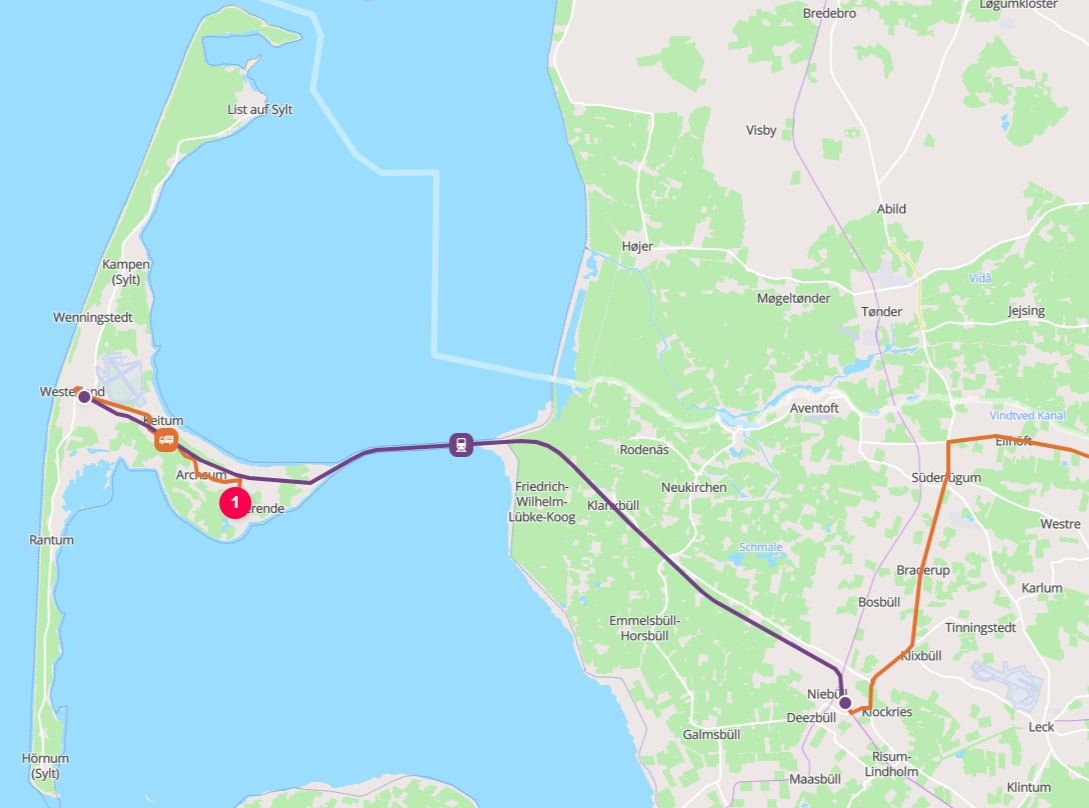
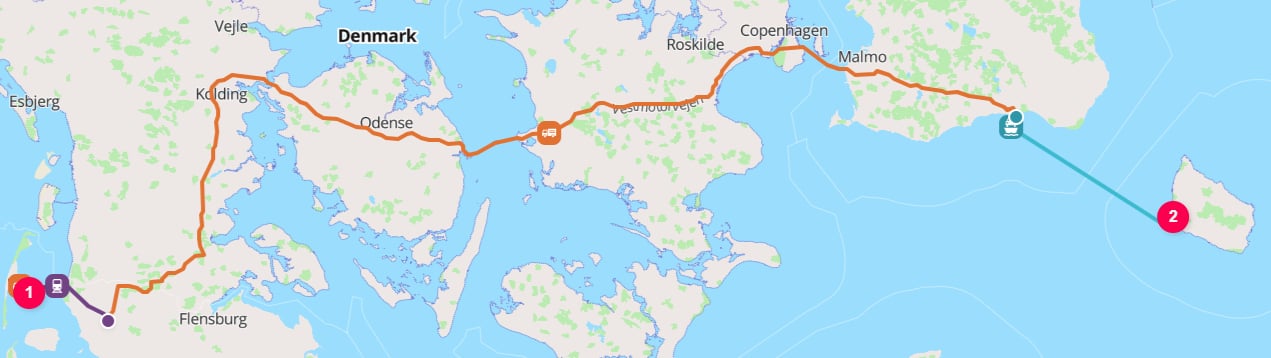
For example, a `ROAD` operation from the German island of Sylt to the Danish island of Bornholms:

```json theme={null}
{
  "cargo": {
    "weight": {
      "value": 1000,
      "unit": "KILOGRAM"
    }
  },
  "origin": {
    "type": "PLACE",
    "address": "Sylt, 25980 Northern Friesland",
    "countryCode": "DE"
  },
  "destination": {
    "type": "PLACE",
    "address": "Sankt Mortens Gade 29, 3700 Rønne",
    "countryCode": "DK"
  },
  "transportChain": [
    {
      "type": "ROAD"
    }
  ]
}
```

<Steps>
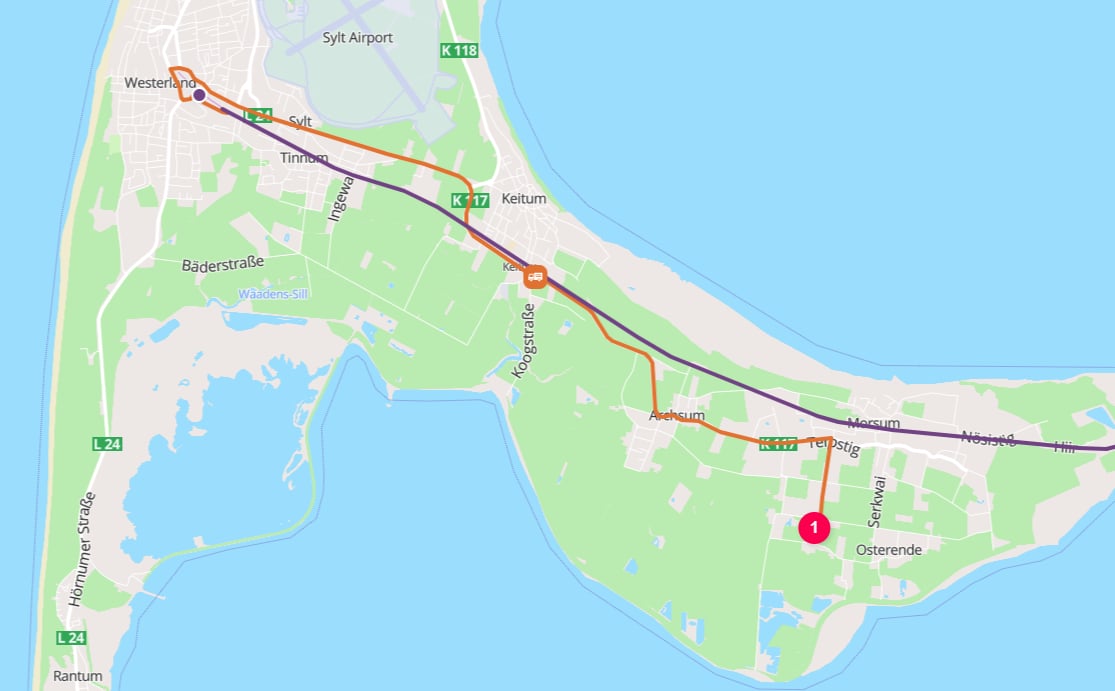
  <Step title="`ROAD` to the Westerland Autoverladung (vehicle shuttle train)">
    Cargo travels by road from postcode 25980 in eastern Sylt to the Westerland Autoverladung terminal, where the vehicle boards a roll-on/roll-off road-rail shuttle train.

    <Frame caption="25980 Sylt to Westerland Autoverladung">
      <img className="block dark:hidden" src="https://mintcdn.com/terratwin/xfw_jqxWpPnqzdZT/images/road-transport/sytl-25980-to-westerland-autoverladung-light.png?fit=max&auto=format&n=xfw_jqxWpPnqzdZT&q=85&s=71a5e3019e7f21cd42dd17530dc6a291" width="1115" height="691" data-path="images/road-transport/sytl-25980-to-westerland-autoverladung-light.png" />

      <img className="hidden dark:block" src="https://mintcdn.com/terratwin/xfw_jqxWpPnqzdZT/images/road-transport/sytl-25980-to-westerland-autoverladung-dark.png?fit=max&auto=format&n=xfw_jqxWpPnqzdZT&q=85&s=bcf0281996e5d6fe2ae347fbfccecd34" width="1115" height="691" data-path="images/road-transport/sytl-25980-to-westerland-autoverladung-dark.png" />
    </Frame>
  </Step>

  <Step title="`RAIL` between Westerland Autoverladung and Niebüll Autoverladung">
    The vehicle remains loaded while it travels between Westerland and Niebüll on the roll-on/roll-off road-rail shuttle train.

    <Frame caption="Westerland Autoverladung to Niebüll Autoverladung">
      <img className="block dark:hidden" src="https://mintcdn.com/terratwin/xfw_jqxWpPnqzdZT/images/road-transport/westerland-autoverladung-to-nieb%C3%BCll-terminal-light.png?fit=max&auto=format&n=xfw_jqxWpPnqzdZT&q=85&s=e9193242f2c4f10cea16dc52035cb730" width="1089" height="808" data-path="images/road-transport/westerland-autoverladung-to-niebüll-terminal-light.png" />

      <img className="hidden dark:block" src="https://mintcdn.com/terratwin/xfw_jqxWpPnqzdZT/images/road-transport/westerland-autoverladung-to-nieb%C3%BCll-terminal-dark.png?fit=max&auto=format&n=xfw_jqxWpPnqzdZT&q=85&s=b9d6b708a343da0452e632194be9fbef" width="1089" height="808" data-path="images/road-transport/westerland-autoverladung-to-niebüll-terminal-dark.png" />
    </Frame>
  </Step>

  <Step title="`ROAD` from Niebüll shuttle train station to the Ystad Ferry Terminal">
    Cargo continues by road from the Niebüll Autoverladung terminal to the Ystad Ferry Terminal in southern Sweden, ready for the next roll-on/roll-off ferry leg.

    <Frame caption="Niebüll Autoverladung to Ystad Ferry Terminal">
      <img className="block dark:hidden" src="https://mintcdn.com/terratwin/xfw_jqxWpPnqzdZT/images/road-transport/sytl-to-bornholm-light.png?fit=max&auto=format&n=xfw_jqxWpPnqzdZT&q=85&s=4b3c983fc8e832982efcef7e736a855e" width="1271" height="358" data-path="images/road-transport/sytl-to-bornholm-light.png" />

      <img className="hidden dark:block" src="https://mintcdn.com/terratwin/xfw_jqxWpPnqzdZT/images/road-transport/sytl-to-bornholm-dark.png?fit=max&auto=format&n=xfw_jqxWpPnqzdZT&q=85&s=39874dd224e0befd21a8b3ddb81b3641" width="1271" height="358" data-path="images/road-transport/sytl-to-bornholm-dark.png" />
    </Frame>
  </Step>

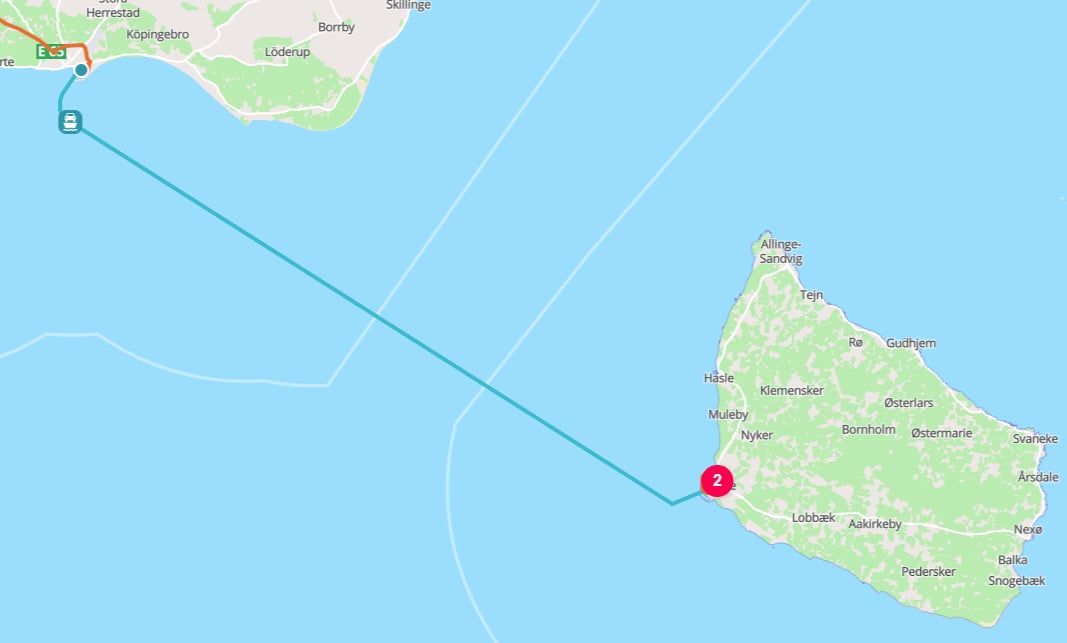
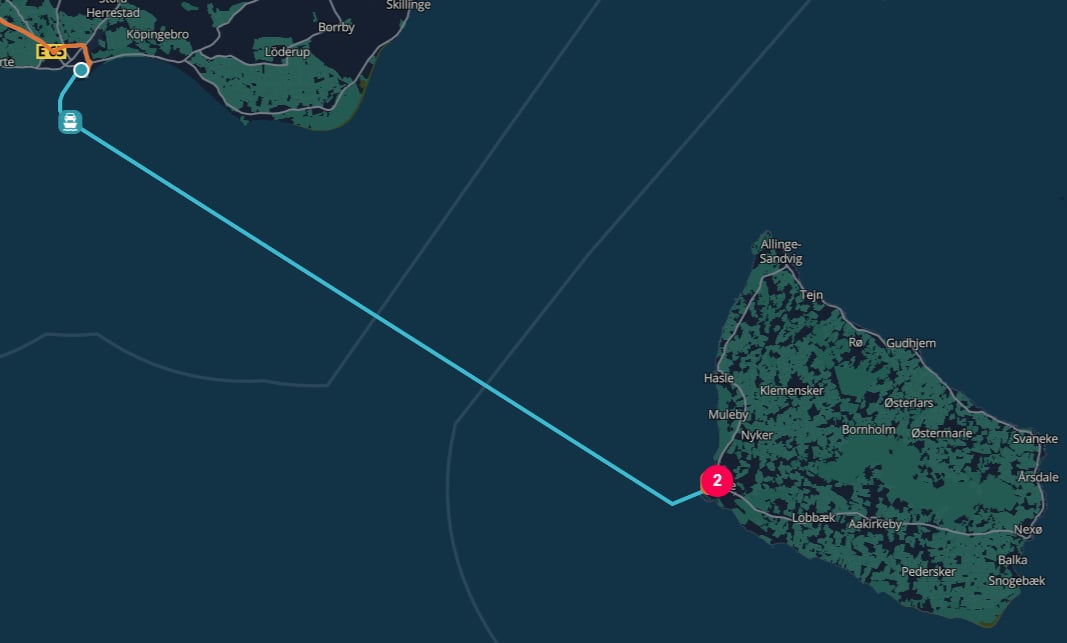
  <Step title="`WATER` from the Ystad Ferry Terminal to the Port of Rønne">
    The cargo crosses from Ystad to Rønne by roll-on/roll-off ferry, with the cargo remaining on the vehicle throughout the sea leg.

    <Frame caption="Ystad Ferry Terminal to the Port of Rønne">
      <img className="block dark:hidden" src="https://mintcdn.com/terratwin/xfw_jqxWpPnqzdZT/images/road-transport/ystad-to-r%C3%B8nne-light.png?fit=max&auto=format&n=xfw_jqxWpPnqzdZT&q=85&s=960a7d4b2b5fbf234eb351d185e282aa" width="1067" height="643" data-path="images/road-transport/ystad-to-rønne-light.png" />

      <img className="hidden dark:block" src="https://mintcdn.com/terratwin/xfw_jqxWpPnqzdZT/images/road-transport/ystad-to-r%C3%B8nne-dark.png?fit=max&auto=format&n=xfw_jqxWpPnqzdZT&q=85&s=533475ddb46429e8227ebeb6f2e803e6" width="1067" height="643" data-path="images/road-transport/ystad-to-rønne-dark.png" />
    </Frame>
  </Step>

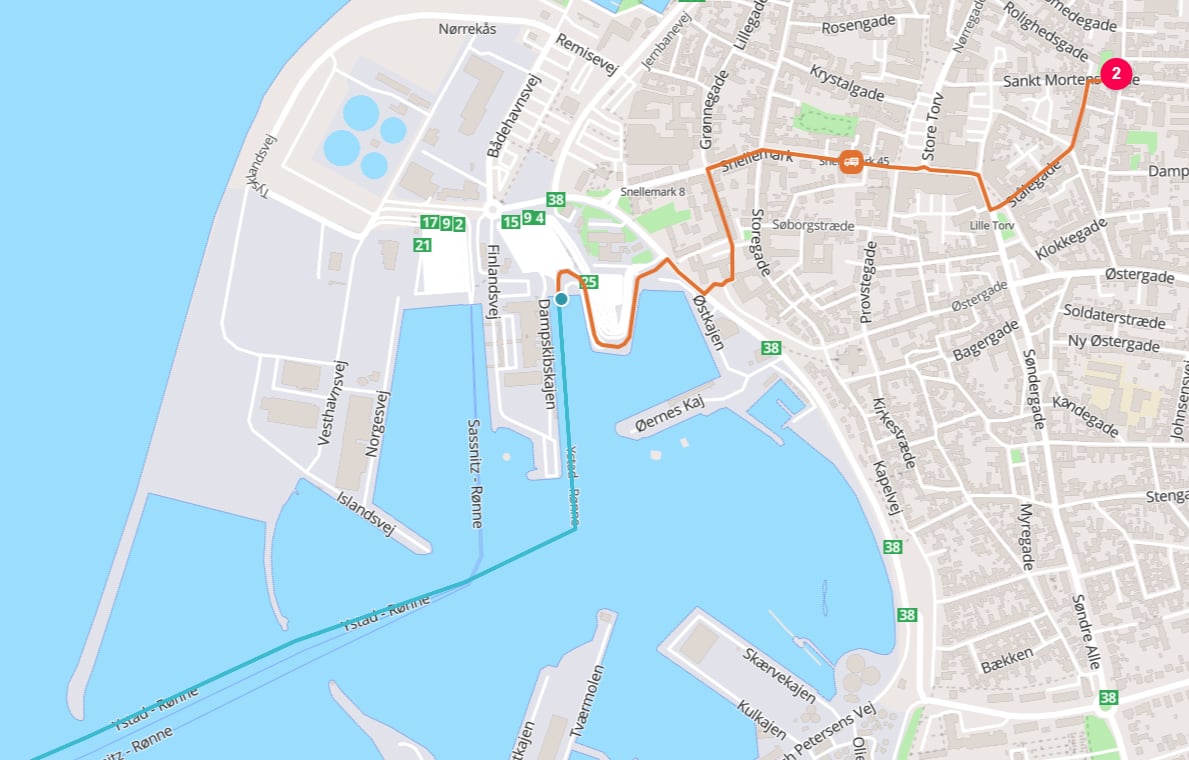
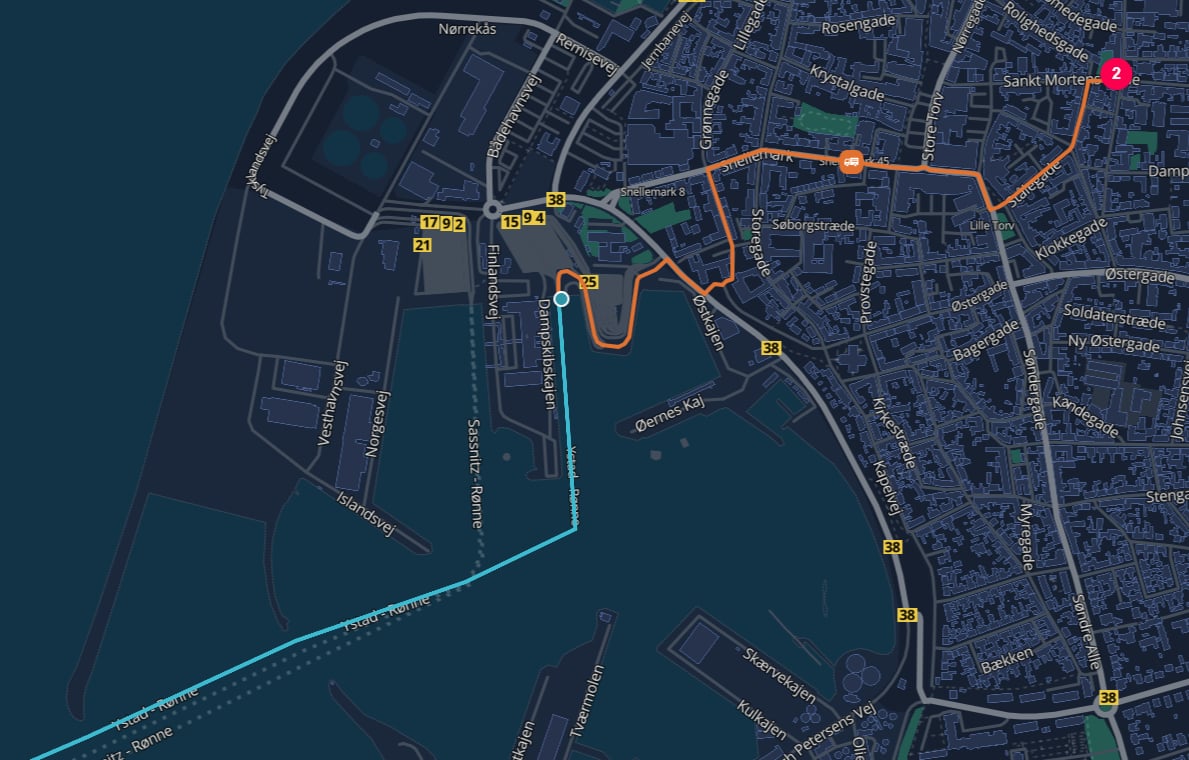
  <Step title="`ROAD` from the Port of Rønne to Bornholm Museum">
    The journey by road from the port of Rønne to Bornholm Museum at Sankt Mortens Gade 29.

    <Frame caption="Port of Rønne to Bornholm Museum">
      <img className="block dark:hidden" src="https://mintcdn.com/terratwin/xfw_jqxWpPnqzdZT/images/road-transport/port-of-r%C3%B8nne-to-bornholm-museum-light.png?fit=max&auto=format&n=xfw_jqxWpPnqzdZT&q=85&s=7ebdf93c80010ff9d1aa652bdbd3ff3a" width="1189" height="760" data-path="images/road-transport/port-of-rønne-to-bornholm-museum-light.png" />

      <img className="hidden dark:block" src="https://mintcdn.com/terratwin/xfw_jqxWpPnqzdZT/images/road-transport/port-of-r%C3%B8nne-to-bornholm-museum-dark.png?fit=max&auto=format&n=xfw_jqxWpPnqzdZT&q=85&s=55e841675df043e95d8dd28227198af5" width="1189" height="760" data-path="images/road-transport/port-of-rønne-to-bornholm-museum-dark.png" />
    </Frame>
  </Step>
</Steps>

No hubs are inserted between these sub-operations, because the cargo is not transshipped.
The freight remains on the same vehicle, trailer, or swap body, so the operation is still treated as one road movement that happens to use a RO-RO ferry or rail service for part of the route.

<Note>
  Use a separate `RAIL` or `WATER` transport operation only when the cargo is actually handled as rail freight or maritime cargo between rail yards or harbors.
  If the truck uses a ferry or train as part of a continuous road journey, model the requested leg as `ROAD` and let TerraTwin include the RO-RO sub-operations.
</Note>

***

## Route polylines

By default, calculation results do not include the geometry of the calculated route.

Set the top-level `options.includeRoutePolylines` property to `true` when you need the route geometry for mapping, visualization, or downstream spatial processing:

```json theme={null}
{
  "options": {
    "includeRoutePolylines": true
  },
  "cargo": {
    "weight": {
      "value": 1000,
      "unit": "KILOGRAM"
    }
  },
  "origin": {
    "type": "PLACE",
    "city": "Paris",
    "countryCode": "FR"
  },
  "destination": {
    "type": "PLACE",
    "city": "London",
    "countryCode": "GB"
  },
  "transportChain": [
    {
      "type": "ROAD"
    }
  ]
}
```

When enabled, the road result includes a `route` property containing a polyline encoded using the Google Encoded Polyline Algorithm Format.

For a road journey that includes roll-on/roll-off rail or ferry sub-operations, the parent `ROAD` result's `route` represents the complete route, including the sub-operation segments. The returned `ROAD`, `RAIL`, and `WATER` sub-operation results also include their corresponding `route` values.

<Note>
  `includeRoutePolylines` defaults to `false`. When it is omitted or set to `false`, the `route` properties are not included in the response.
</Note>

***

## Routing failure and mode fallback

Road routing can fail when TerraTwin cannot build a feasible road operation for the requested leg.
This can happen when the start or end location is on an island with no road or roll-on/roll-off access, or when there is no continuous route using roads, RO-RO ferries, and RO-RO trains between the locations.

Use `options.fallbackTransportModes` to let TerraTwin switch to another transport mode when the requested road operation cannot be realized.
Fallback modes are tried in the order you provide, excluding `ROAD` because it is the mode that failed.

```json theme={null}
{
  "options": {
    "fallbackTransportModes": ["ROAD", "WATER", "AIR"]
  },
  "cargo": {
    "weight": {
      "value": 500,
      "unit": "KILOGRAM"
    }
  },
  "origin": {
    "type": "PLACE",
    "city": "Houston",
    "countryCode": "US"
  },
  "destination": {
    "type": "PLACE",
    "city": "Honolulu",
    "countryCode": "US"
  },
  "transportChain": [
    {
      "type": "ROAD"
    }
  ]
}
```

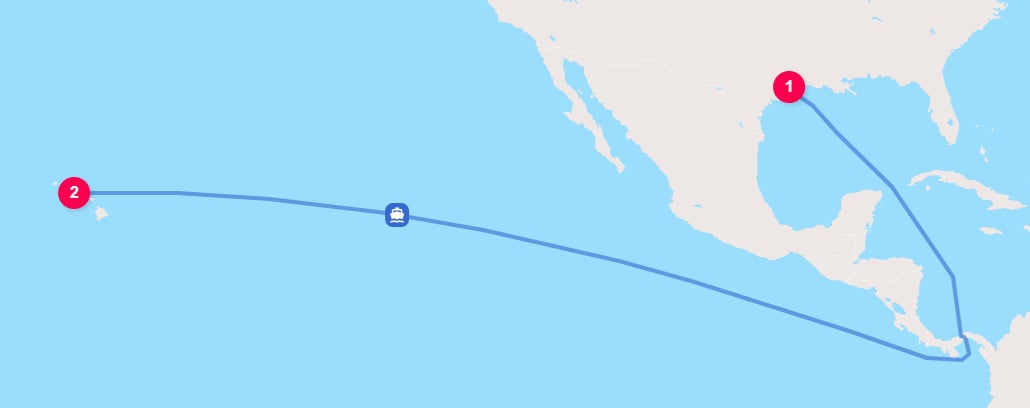
In this pattern, TerraTwin first attempts to calculate the leg as road transport.
If no feasible road route exists, it tries the fallback modes in order.
The first fallback mode that can be routed and calculated is returned.
Fallback attempts use the fallback mode's own defaulted configuration.
If every fallback attempt fails, the API returns the error from the final fallback mode attempted.

<Frame caption="Houston to Honolulu falls back to `WATER` transport">
  <img className="block dark:hidden" src="https://mintcdn.com/terratwin/xfw_jqxWpPnqzdZT/images/road-transport/houston-to-honolulu-light.png?fit=max&auto=format&n=xfw_jqxWpPnqzdZT&q=85&s=963a00c72ee63aea2cc64ab13f2227d7" width="1030" height="408" data-path="images/road-transport/houston-to-honolulu-light.png" />

  <img className="hidden dark:block" src="https://mintcdn.com/terratwin/xfw_jqxWpPnqzdZT/images/road-transport/houston-to-honolulu-dark.png?fit=max&auto=format&n=xfw_jqxWpPnqzdZT&q=85&s=c5e83f5f4db6d5d9a1da78e9a5ba6741" width="1030" height="408" data-path="images/road-transport/houston-to-honolulu-dark.png" />
</Frame>

<Note>
  If a road operation fails and TerraTwin uses a fallback mode instead, any `id` or `context` provided on the failed road operation is preserved and returned with the replacement operation's result.
</Note>

***

## Recommendations

<Steps>
  <Step title="Set the road mode explicitly">
    Use `type: "ROAD"` in the transport operation when the leg is known to move by road vehicle.
  </Step>

  <Step title="Prefer vehicle weight information">
    Provide `grossWeightBand` when available. If not, provide `grossWeight`, `maximumWeight`, or `emptyWeight` with units.
  </Step>

  <Step title="Add structure when known">
    Use `ARTICULATED`, `RIGID`, or `DUMP` to distinguish the vehicle configuration. This improves vehicle classification, especially when combined with a weight input.
  </Step>

  <Step title="Use the source region's weight band">
    Gross weight bands are region-sensitive. Use the band available in your source data; TerraTwin maps it to the appropriate local equivalent for the route.
  </Step>

  <Step title="Review loading assumptions">
    Provide `loadDistribution`, `loadFactor`, and `emptyRunning` when known. Otherwise let TerraTwin apply consistent defaults for the selected vehicle, region, and packaging.
  </Step>

  <Step title="Set energy type">
    Provide `energyType` when the vehicle fuel or energy is known.
    If omitted, TerraTwin selects the most common energy type for the country of operation and vehicle size.
  </Step>

  <Step title="Use consumption data when available">
    Provide `energyConsumption` for measured fuel, electricity, or efficiency data. This switches the road calculation to consumption based primary data.
  </Step>

  <Step title="Provide dates when available">
    Add `departureDateTime` or `arrivalDateTime` when known. Dates improve reporting, certificates, analytics, and time-based interpretation.
  </Step>

  <Step title="Let RO-RO stay inside road">
    Do not manually insert hubs for roll-on/roll-off ferry or rail segments where the cargo remains on the vehicle, trailer, or swap body. TerraTwin includes those as road sub-operations.
  </Step>

  <Step title="Include route geometry when needed">
    Set `options.includeRoutePolylines` to `true` when you need the calculated route in the response. Decode returned `route` values using the Google Encoded Polyline Algorithm Format.
  </Step>

  <Step title="Use fallback modes for uncertain routability">
    Add `options.fallbackTransportModes` when a requested road route may not be feasible and another mode should be attempted automatically.
  </Step>
</Steps>