> ## Documentation Index
> Fetch the complete documentation index at: https://docs.terratwin.com/llms.txt
> Use this file to discover all available pages before exploring further.
# Unknown transport
> Use UNKNOWN when the transport mode is not known and TerraTwin should select the first feasible fallback mode.
An `UNKNOWN` transport operation is used when the shipment origin and destination are known, but the transport mode is not.
TerraTwin tries a sequence of specific fallback transport modes in order, modeling each one in turn until a route can be calculated successfully.
Use an explicit transport type such as [`ROAD`](/content/guides/road-transport), [`RAIL`](/content/guides/rail-transport), [`WATER`](/content/guides/water-transport), or [`AIR`](/content/guides/air-transport) whenever the mode is known. An `UNKNOWN` operation uses defaulted mode configurations and may select a different mode than expected.
***
## Basic shape
Set the transport operation `type` to `UNKNOWN`:
```json theme={null}
{
"cargo": {
"weight": {
"value": 30,
"unit": "KILOGRAM"
}
},
"origin": {
"type": "PLACE",
"address": "Shenzhen",
"countryCode": "CN"
},
"destination": {
"type": "PLACE",
"address": "Madrid",
"countryCode": "ES"
},
"transportChain": [
{
"type": "UNKNOWN"
}
]
}
```
In this example, the shipment travels from Shenzhen to Madrid, but the transport mode is not specified.
That means TerraTwin treats the operation as UNKNOWN and tries specific fallback transport modes one by one.
TerraTwin does not combine all of them or compare them all at once; instead, it attempts them in order and uses the first one that can be routed and calculated successfully.
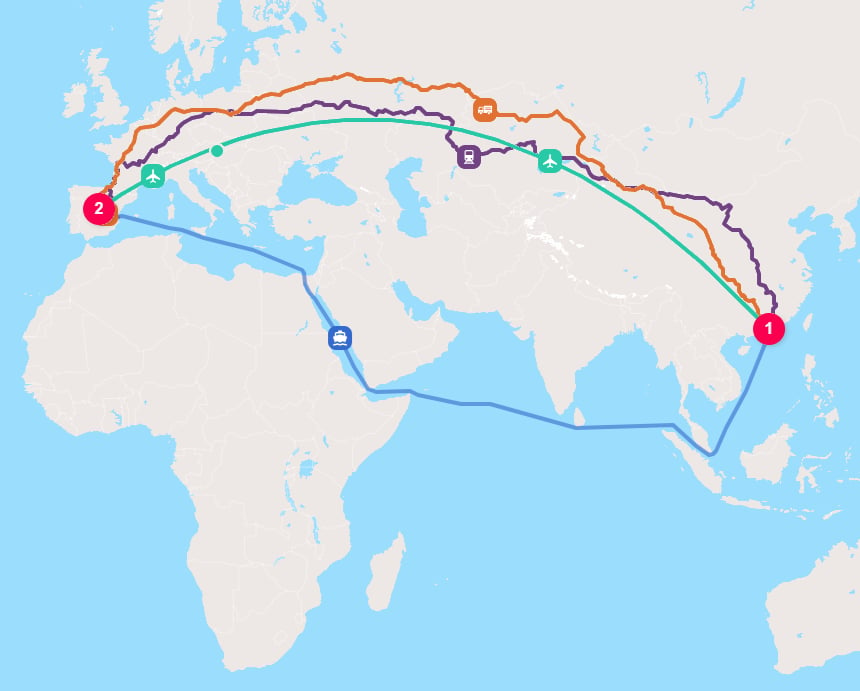
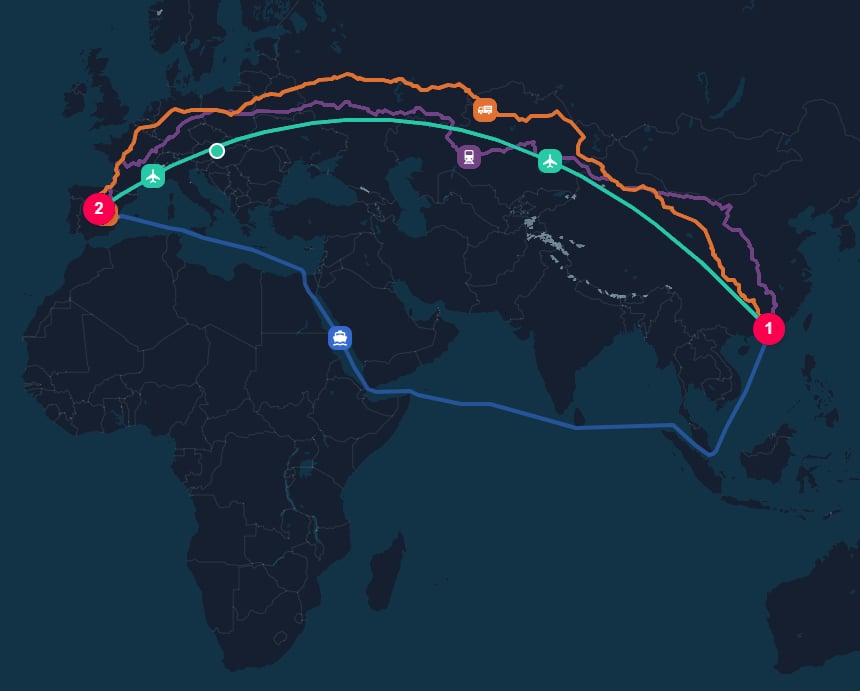 For each fallback mode, TerraTwin uses a fully defaulted configuration.
It stops as soon as one mode succeeds and returns the result for that mode.
It does not calculate every mode or select the mode with the lowest emissions.
If every fallback mode fails, the API returns the error from the final mode attempted.
***
## Properties
| Property | Required | What it does |
| --------- | -------: | -------------------------------------------------------------------------- |
| `type` | Yes | Selects unknown-mode fallback behavior. Use `UNKNOWN`. |
| `id` | No | Optional identifier returned on the corresponding transport result. |
| `context` | No | Caller-provided metadata returned with the corresponding transport result. |
Mode-specific properties such as a vehicle, train type, vessel, or aircraft cannot be configured on an `UNKNOWN` operation. To control those details, select the transport mode explicitly.
***
## Omitting the transport chain
Leaving `transportChain` out of the request, or providing an empty array, has effectively the same calculation behavior as a single `UNKNOWN` operation:
```json theme={null}
{
"cargo": {
"weight": {
"value": 100,
"unit": "KILOGRAM"
}
},
"origin": {
"type": "PLACE",
"city": "Madrid",
"countryCode": "ES"
},
"destination": {
"type": "PLACE",
"city": "Barcelona",
"countryCode": "ES"
}
}
```
Use an explicit `UNKNOWN` element when you want to provide an operation level `id` or `context` and have it returned with the corresponding result.
***
## Choosing the fallback order
By default, TerraTwin tries the following modes in order:
1. `ROAD`
2. `WATER`
3. `AIR`
Use `options.fallbackTransportModes` to provide a different order:
```json theme={null}
{
"options": {
"fallbackTransportModes": ["RAIL", "ROAD", "WATER", "AIR"]
}
}
```
In this example, TerraTwin attempts `RAIL` first, followed by `ROAD`, `WATER`, and `AIR`.
The order matters: the first mode that succeeds is selected, even if a later mode would also be feasible.
The supported fallback modes are `AIR`, `RAIL`, `ROAD`, and `WATER`.
***
## Recommendations
Select a specific transport type when the shipment mode is available. This gives you control over mode specific parameters and produces a more deliberate calculation.
Put the most plausible or preferred mode first. TerraTwin stops at the first mode that can be routed and calculated successfully.
Fallback operations use default mode configurations, but accurate cargo weight, category, and locations still improve vehicle selection, routing, and emissions results.
For each fallback mode, TerraTwin uses a fully defaulted configuration.
It stops as soon as one mode succeeds and returns the result for that mode.
It does not calculate every mode or select the mode with the lowest emissions.
If every fallback mode fails, the API returns the error from the final mode attempted.
***
## Properties
| Property | Required | What it does |
| --------- | -------: | -------------------------------------------------------------------------- |
| `type` | Yes | Selects unknown-mode fallback behavior. Use `UNKNOWN`. |
| `id` | No | Optional identifier returned on the corresponding transport result. |
| `context` | No | Caller-provided metadata returned with the corresponding transport result. |
Mode-specific properties such as a vehicle, train type, vessel, or aircraft cannot be configured on an `UNKNOWN` operation. To control those details, select the transport mode explicitly.
***
## Omitting the transport chain
Leaving `transportChain` out of the request, or providing an empty array, has effectively the same calculation behavior as a single `UNKNOWN` operation:
```json theme={null}
{
"cargo": {
"weight": {
"value": 100,
"unit": "KILOGRAM"
}
},
"origin": {
"type": "PLACE",
"city": "Madrid",
"countryCode": "ES"
},
"destination": {
"type": "PLACE",
"city": "Barcelona",
"countryCode": "ES"
}
}
```
Use an explicit `UNKNOWN` element when you want to provide an operation level `id` or `context` and have it returned with the corresponding result.
***
## Choosing the fallback order
By default, TerraTwin tries the following modes in order:
1. `ROAD`
2. `WATER`
3. `AIR`
Use `options.fallbackTransportModes` to provide a different order:
```json theme={null}
{
"options": {
"fallbackTransportModes": ["RAIL", "ROAD", "WATER", "AIR"]
}
}
```
In this example, TerraTwin attempts `RAIL` first, followed by `ROAD`, `WATER`, and `AIR`.
The order matters: the first mode that succeeds is selected, even if a later mode would also be feasible.
The supported fallback modes are `AIR`, `RAIL`, `ROAD`, and `WATER`.
***
## Recommendations
Select a specific transport type when the shipment mode is available. This gives you control over mode specific parameters and produces a more deliberate calculation.
Put the most plausible or preferred mode first. TerraTwin stops at the first mode that can be routed and calculated successfully.
Fallback operations use default mode configurations, but accurate cargo weight, category, and locations still improve vehicle selection, routing, and emissions results.